
Silk Mobile
Table of Contents (Homepage)
- Overview
- Setting Up
- Getting Started
- How To
- Connecting Devices And Emulators
- Preparing Applications For Testing
- Managing Applications
- Recording Tests
- Working With Test Commands
- Adding Commands To Your Scripts
- Object Commands
- Click
- ClickCoordinate
- ClickIn
- ClickOffset
- Drag
- ElementGetProperty
- ElementGetTableRowsCount
- ElementListPick
- ElementListSelect
- ElementListVisible
- ElementScrollToTableRow
- ElementSendText
- ElementSetProperty
- ElementSwipe
- ElementSwipeWhileNotFound
- GetAllValues
- GetElementCount
- GetElementCountIn
- GetTextIn
- IsElementBlank
- IsElementFound
- IsFoundIn
- LongClick
- RunNativeAPICall
- SendWhileNotFound
- VerifyElementFound
- VerifyElementNotFound
- VerifyIn
- WaitForElement
- WaitForElementToVanish
- GetCoordinateColor
- DragDrop
- Application Commands
- Device Commands
- Web (Hybrid) Specific Commands
- Utilities Commands
- Monitoring Commands
- Configuration Commands
- ExtractLanguageFiles
- SetDefaultClickDownTime
- SetDefaultTimeOut
- SetDefaultWebView
- SetDragStartDelay
- SetInKeyDelay
- SetKeyToKeyDelay
- SetLanguage
- SetLanguagePropertiesFile
- SetShowImageInReport
- SetShowPassImageInReport
- SetShowReport
- SetSpeed
- SetThrowExceptionOnFail
- SetWebAutoScroll
- StartStepsGroup
- StopStepsGroup
- TextFilter
- Miscellaneous Commands
- Controlling Element Identification Rules
- Editing Test Objects
- Executing Test Scripts
- Report Of Executed Test
- Working From Code Environment
- Continuous Integration
- Layout Verification Tests
- Use Device Vitals Monitors
- Troubleshooting
- Terminology
WaitForElementToVanish
WaitForElementToVanish(Zone, Element, Index, Timeout)
|
|
|
|
|
|
|






Description
Wait for Element to disappear from the screen
Parameters
Usage
Scenario:
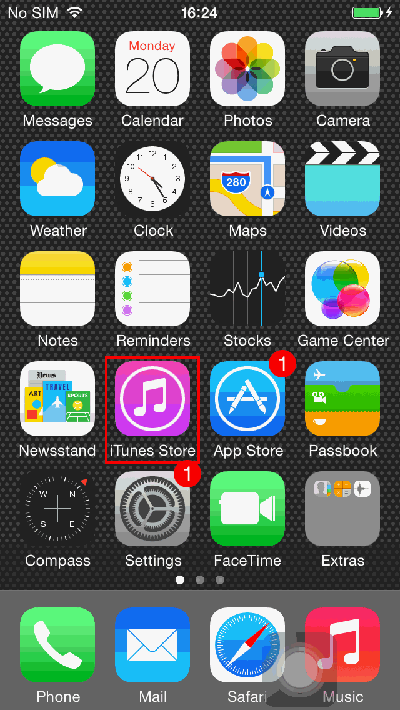
In this Example we will call up the iTunes store. While the page is loading an icon will appear indicating the page load is in progress. The WaitForElementToVanish command instructs Silk Mobile not to perform the next operation until the loading icon has vanished, indicating the page is done loading.
Step 1: Click on the iTunes Store icon. The phone will begin loading the next page.
Step 2: The phone is loading, up top there is a specific icon indicating the page load is in progress.
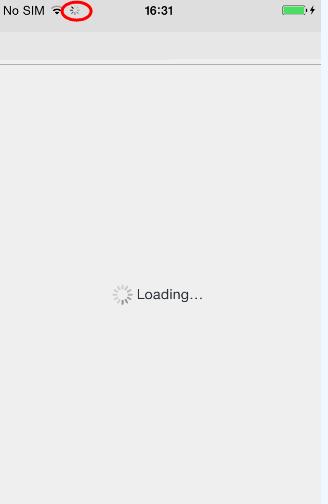
The command instructs Silk Mobile to wait for this element to vanish from the screen, indicating the page has loaded before performing the next operation.
Step 3: The following command, to change the setting from featured to charts could not have been performed until the page finished loading.
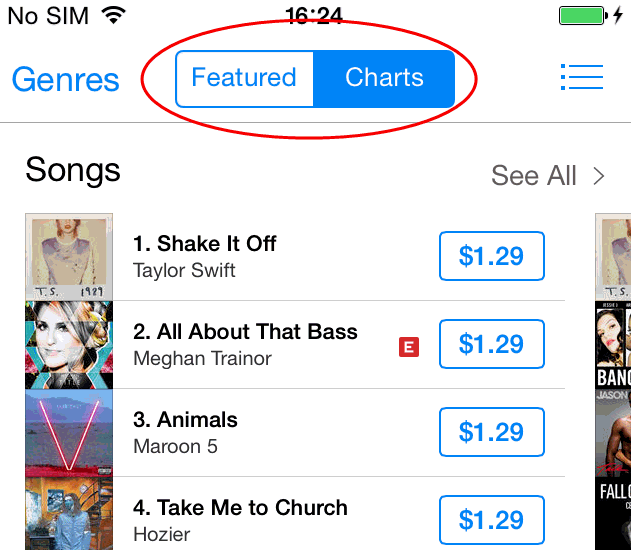
Command usage: In order to wait for element to vanish before moving to the next step.
Parameters:
-
Zone – will be set to "NATIVE"
-
Element – Select "loading" Element to wait for it to vanish from the top of the screen while the page is loading.
-
Index – will be set to "0".
-
Timeout – will be set to "10000" (= 10 seconds). Will return false if element is still visible after time out period elapses.
Code Examples
if(client.waitForElementToVanish("NATIVE", "xpath=//*[@accessibilityLabel='Network connection in progress']", 0, 10000)){// If statement}if (client.WaitForElementToVanish("NATIVE", "xpath=//*[@accessibilityLabel='Network connection in progress']", 0, 10000)){ // Consequent statement }If StrComp (client.WaitForElementToVanish ( "NATIVE", "xpath=//*[@accessibilityLabel='Network connection in progress']", 0, 10000 ), "True") = 0 Then Report 'If statementElse ReportEnd Ifif(self.client.waitForElementToVanish("NATIVE", "xpath=//*[@accessibilityLabel='Network connection in progress']", 0, 10000)):# If statementpassif($client->waitForElementToVanish("NATIVE", "xpath=//*[\@accessibilityLabel='Network connection in progress']", 0, 10000)){ # If statement}