
Silk Mobile
Table of Contents (Homepage)
- Overview
- Setting Up
- Getting Started
- How To
- Connecting Devices And Emulators
- Preparing Applications For Testing
- Managing Applications
- Recording Tests
- Working With Test Commands
- Adding Commands To Your Scripts
- Object Commands
- Click
- ClickCoordinate
- ClickIn
- ClickOffset
- Drag
- ElementGetProperty
- ElementGetTableRowsCount
- ElementListPick
- ElementListSelect
- ElementListVisible
- ElementScrollToTableRow
- ElementSendText
- ElementSetProperty
- ElementSwipe
- ElementSwipeWhileNotFound
- GetAllValues
- GetElementCount
- GetElementCountIn
- GetTextIn
- IsElementBlank
- IsElementFound
- IsFoundIn
- LongClick
- RunNativeAPICall
- SendWhileNotFound
- VerifyElementFound
- VerifyElementNotFound
- VerifyIn
- WaitForElement
- WaitForElementToVanish
- GetCoordinateColor
- DragDrop
- Application Commands
- Device Commands
- Web (Hybrid) Specific Commands
- Utilities Commands
- Monitoring Commands
- Configuration Commands
- ExtractLanguageFiles
- SetDefaultClickDownTime
- SetDefaultTimeOut
- SetDefaultWebView
- SetDragStartDelay
- SetInKeyDelay
- SetKeyToKeyDelay
- SetLanguage
- SetLanguagePropertiesFile
- SetShowImageInReport
- SetShowPassImageInReport
- SetShowReport
- SetSpeed
- SetThrowExceptionOnFail
- SetWebAutoScroll
- StartStepsGroup
- StopStepsGroup
- TextFilter
- Miscellaneous Commands
- Controlling Element Identification Rules
- Editing Test Objects
- Executing Test Scripts
- Report Of Executed Test
- Working From Code Environment
- Continuous Integration
- Layout Verification Tests
- Use Device Vitals Monitors
- Troubleshooting
- Terminology
WaitForElement
WaitForElement(String Zone, String Element, int Index, int Timeout)
|
|
|
|
|
|
|






Description
Sets sleep until element is identified.
Parameters
-
Zone: Select Zone
-
Element: Query to identify the objects/Name of the element on the object repository.
-
Index: Element Order (the number of times the element appears more than once). Index=0 refers to the first appearance of the element; Index=1 refers to the second appearance of the element, etc.
-
Timeout: Waiting Timeout in milliseconds.
Usage
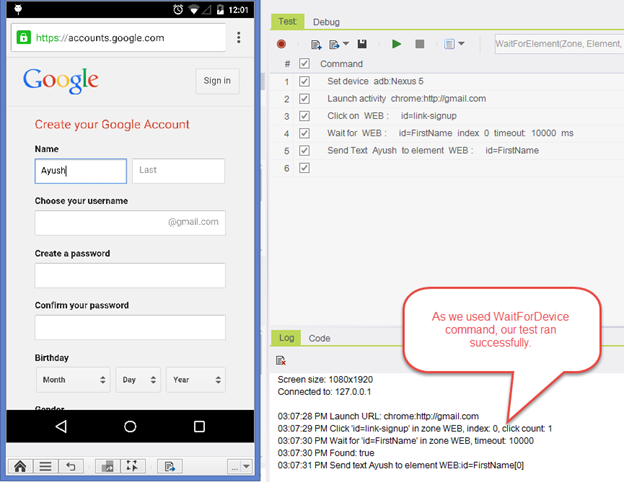
Scenario: On the following scenario we will try to create an account on gmail.com.
We will see that it might take time to load the page, so by adding a step of waitForElement the test stability is improved.
Step 1: Launch google.com using the chrome browser.
Step 2: Click the create an account button.
Step 3: Fill in name on Name text field.
Test:

Web page was not fully loaded. Element was not identified before the click command's timout which resulted on the test failing.
How to resolve this issue
We will use the WaitForElement command. Silk Mobile will wait for the element and it will not move to the next step.
Code Examples
client.waitForElement("WEB", "id=FirstName", 0, 10000)client.WaitForElement("WEB", "id=FirstName", 0, 10000)client.WaitForElement ("WEB", "id=FirstName", 0, 10000)self.client.waitForElement("WEB", "id=FirstName", 0, 10000) $client->waitForElement("WEB", "id=FirstName", 0, 10000)