
Silk Mobile
Table of Contents (Homepage)
- Overview
- Setting Up
- Getting Started
- How To
- Connecting Devices And Emulators
- Preparing Applications For Testing
- Managing Applications
- Recording Tests
- Working With Test Commands
- Adding Commands To Your Scripts
- Object Commands
- Click
- ClickCoordinate
- ClickIn
- ClickOffset
- Drag
- ElementGetProperty
- ElementGetTableRowsCount
- ElementListPick
- ElementListSelect
- ElementListVisible
- ElementScrollToTableRow
- ElementSendText
- ElementSetProperty
- ElementSwipe
- ElementSwipeWhileNotFound
- GetAllValues
- GetElementCount
- GetElementCountIn
- GetTextIn
- IsElementBlank
- IsElementFound
- IsFoundIn
- LongClick
- RunNativeAPICall
- SendWhileNotFound
- VerifyElementFound
- VerifyElementNotFound
- VerifyIn
- WaitForElement
- WaitForElementToVanish
- GetCoordinateColor
- DragDrop
- Application Commands
- Device Commands
- Web (Hybrid) Specific Commands
- Utilities Commands
- Monitoring Commands
- Configuration Commands
- ExtractLanguageFiles
- SetDefaultClickDownTime
- SetDefaultTimeOut
- SetDefaultWebView
- SetDragStartDelay
- SetInKeyDelay
- SetKeyToKeyDelay
- SetLanguage
- SetLanguagePropertiesFile
- SetShowImageInReport
- SetShowPassImageInReport
- SetShowReport
- SetSpeed
- SetThrowExceptionOnFail
- SetWebAutoScroll
- StartStepsGroup
- StopStepsGroup
- TextFilter
- Miscellaneous Commands
- Controlling Element Identification Rules
- Editing Test Objects
- Executing Test Scripts
- Report Of Executed Test
- Working From Code Environment
- Continuous Integration
- Layout Verification Tests
- Use Device Vitals Monitors
- Troubleshooting
- Terminology
Drag
Drag(Zone, Element, Index, XOffset, YOffset)
|
|
|
|
|
|
|






Description
Drag an element or text in a specified zone (you can drag the second, third, etc appearance of the element by setting Index to 1, 2, etc)
Parameters
-
Zone - Select Zone
-
Element - Select Element from drop-down list OR (for OCR text identification) insert text into the empty box in the drop down list
-
Index - Element Order (the number of times the element appears more than once)
-
XOffset - Horizontal Offset from the Element in screen pixels (negative values are possible, can use P2cx to convert screen percentage to pixels)
-
YOffset - Vertical Offset from the Element in screen pixels (negative values are possible, can use P2cy to convert screen percentage to pixels)
Usage
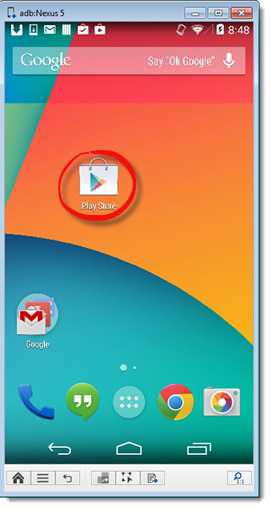
Scenario : In the following example, we will use the drag command together with the SetDragStartDelay command in order to move the Play Store icon across the device's springboard.
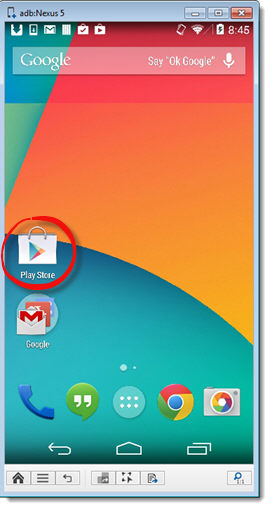
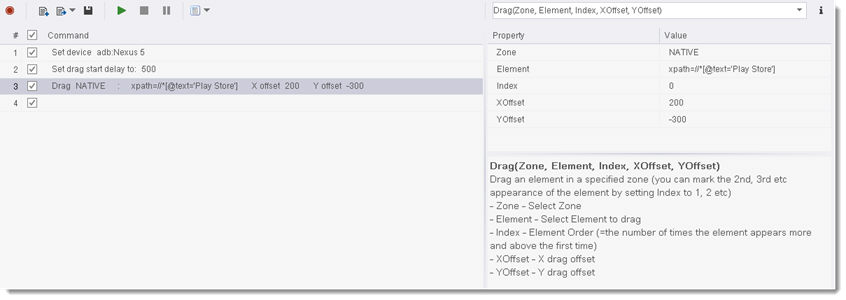
Command usage: We will first use the SetDragStartDelay command in order to press the element for 1000 milliseconds before starting the drag. We will then use the Drag command with the following configurations:
Parameters:
-
Zone - will be set to NATIVE
-
Element - will be set to xpath=//*[@text='Play Store'] in order to identify the Play Store icon element
-
Index - will be set to 0
-
XOffset - X drag offset - will be set to 200 (200 pixels drag to the right)
-
YOffset - Y drag offset - will be set to -300 (300 pixels drag in the up direction)
This will be the result of the sequence:
Code Examples