Silk Mobile
Table of Contents (Homepage)
- Overview
- Setting Up
- Getting Started
- How To
- Connecting Devices And Emulators
- Preparing Applications For Testing
- Managing Applications
- Recording Tests
- Working With Test Commands
- Adding Commands To Your Scripts
- Object Commands
- Click
- ClickCoordinate
- ClickIn
- ClickOffset
- Drag
- ElementGetProperty
- ElementGetTableRowsCount
- ElementListPick
- ElementListSelect
- ElementListVisible
- ElementScrollToTableRow
- ElementSendText
- ElementSetProperty
- ElementSwipe
- ElementSwipeWhileNotFound
- GetAllValues
- GetElementCount
- GetElementCountIn
- GetTextIn
- IsElementBlank
- IsElementFound
- IsFoundIn
- LongClick
- RunNativeAPICall
- SendWhileNotFound
- VerifyElementFound
- VerifyElementNotFound
- VerifyIn
- WaitForElement
- WaitForElementToVanish
- GetCoordinateColor
- DragDrop
- Application Commands
- Device Commands
- Web (Hybrid) Specific Commands
- Utilities Commands
- Monitoring Commands
- Configuration Commands
- ExtractLanguageFiles
- SetDefaultClickDownTime
- SetDefaultTimeOut
- SetDefaultWebView
- SetDragStartDelay
- SetInKeyDelay
- SetKeyToKeyDelay
- SetLanguage
- SetLanguagePropertiesFile
- SetShowImageInReport
- SetShowPassImageInReport
- SetShowReport
- SetSpeed
- SetThrowExceptionOnFail
- SetWebAutoScroll
- StartStepsGroup
- StopStepsGroup
- TextFilter
- Miscellaneous Commands
- Controlling Element Identification Rules
- Editing Test Objects
- Executing Test Scripts
- Report Of Executed Test
- Working From Code Environment
- Continuous Integration
- Layout Verification Tests
- Use Device Vitals Monitors
- Troubleshooting
- Terminology
Ruby
Here are instructions on how to export Silk Mobile scripts to Ruby code:
Get script code in Ruby:
Step 1: Create a test case.
Step 2: Click on the Code tab.

Step 3: Click on the drop down button of Languages and Select Ruby.
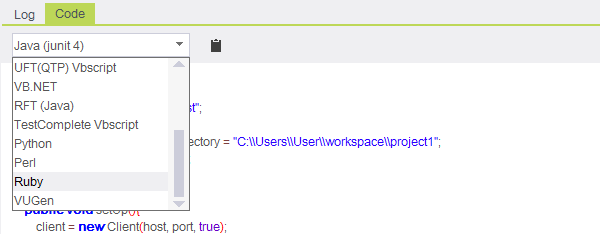
Code will automatically generate in Ruby language.
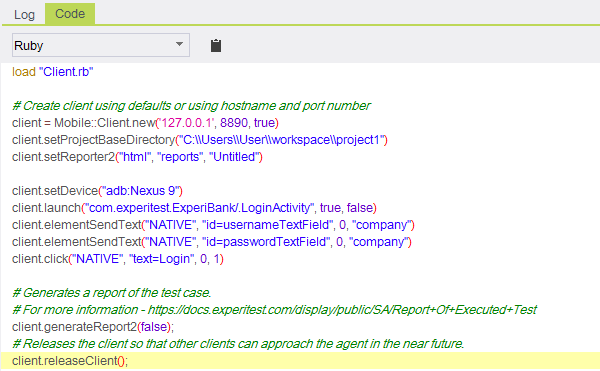
Step 4: Copy the generated code in Ruby and paste it into a text file. Here is an example of such a generated code:
load "Client.rb"# Create client using defaults or using hostname and port numberclient = Mobile::Client.new('127.0.0.1', 8890, true)client.setProjectBaseDirectory("C:\\Users\\User\\workspace\\project1")client.setReporter2("html", "reports", "Untitled")client.setDevice("adb:Nexus 9")client.launch("com.experitest.ExperiBank/.LoginActivity", true, false)client.elementSendText("NATIVE", "id=usernameTextField", 0, "company")client.elementSendText("NATIVE", "id=passwordTextField", 0, "company")client.click("NATIVE", "text=Login", 0, 1)# Generates a report of the test case.# For more information - http://supportline.microfocus.com/Documentation/books/ASQ/SilkMobile/90/help/Report+Of+Executed+Testclient.generateReport2(false);# Releases the client so that other clients can approach the agent in the near future. client.releaseClient();
Step 5: Save it with .rb extension.
Run your script:
Step 1: Copy the file Client.rb from the <SilkMobile>\clients\ruby folder and paste it to the same directory where your Ruby script is saved.

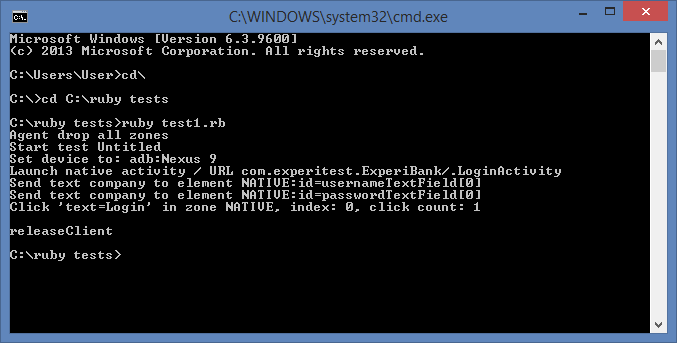
Step 2: From the command line go to the script location and run it using the command: ruby <ScriptName>