
Silk Mobile
Table of Contents (Homepage)
- Overview
- Setting Up
- Getting Started
- How To
- Connecting Devices And Emulators
- Preparing Applications For Testing
- Managing Applications
- Recording Tests
- Working With Test Commands
- Adding Commands To Your Scripts
- Object Commands
- Click
- ClickCoordinate
- ClickIn
- ClickOffset
- Drag
- ElementGetProperty
- ElementGetTableRowsCount
- ElementListPick
- ElementListSelect
- ElementListVisible
- ElementScrollToTableRow
- ElementSendText
- ElementSetProperty
- ElementSwipe
- ElementSwipeWhileNotFound
- GetAllValues
- GetElementCount
- GetElementCountIn
- GetTextIn
- IsElementBlank
- IsElementFound
- IsFoundIn
- LongClick
- RunNativeAPICall
- SendWhileNotFound
- VerifyElementFound
- VerifyElementNotFound
- VerifyIn
- WaitForElement
- WaitForElementToVanish
- GetCoordinateColor
- DragDrop
- Application Commands
- Device Commands
- Web (Hybrid) Specific Commands
- Utilities Commands
- Monitoring Commands
- Configuration Commands
- ExtractLanguageFiles
- SetDefaultClickDownTime
- SetDefaultTimeOut
- SetDefaultWebView
- SetDragStartDelay
- SetInKeyDelay
- SetKeyToKeyDelay
- SetLanguage
- SetLanguagePropertiesFile
- SetShowImageInReport
- SetShowPassImageInReport
- SetShowReport
- SetSpeed
- SetThrowExceptionOnFail
- SetWebAutoScroll
- StartStepsGroup
- StopStepsGroup
- TextFilter
- Miscellaneous Commands
- Controlling Element Identification Rules
- Editing Test Objects
- Executing Test Scripts
- Report Of Executed Test
- Working From Code Environment
- Continuous Integration
- Layout Verification Tests
- Use Device Vitals Monitors
- Troubleshooting
- Terminology
VerifyIn
void VerifyIn (Zone, SearchElement, Index, Direction, ElementFindZone, ElementToFind, Width, Height)






Description
Search for an element and verify that an element related to it exists. The direction can be UP, DOWN, LEFT or RIGHT.
Parameters
If the searched element is not found, this function will throw exception.
-
Zone: Select Zone
-
SearchElement: Search Element
-
Index: Element index
-
Direction: Direction to analyze
-
ElementFindZone: Find Element Zone
-
ElementToFind: Element to Find
-
Width: Width of the search ("0" indicates until the end/start of the window)
-
Height: Height of the search ("0" indicates until the end/start of the window)
Usage
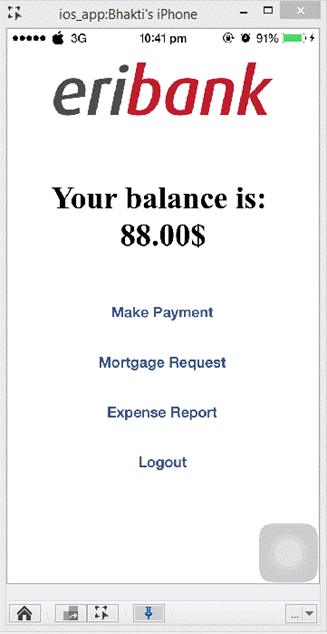
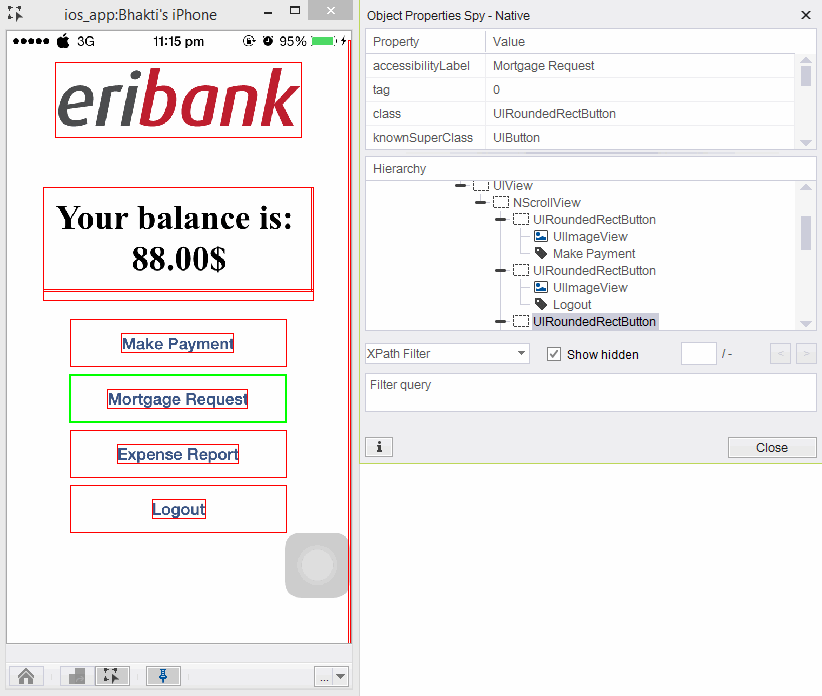
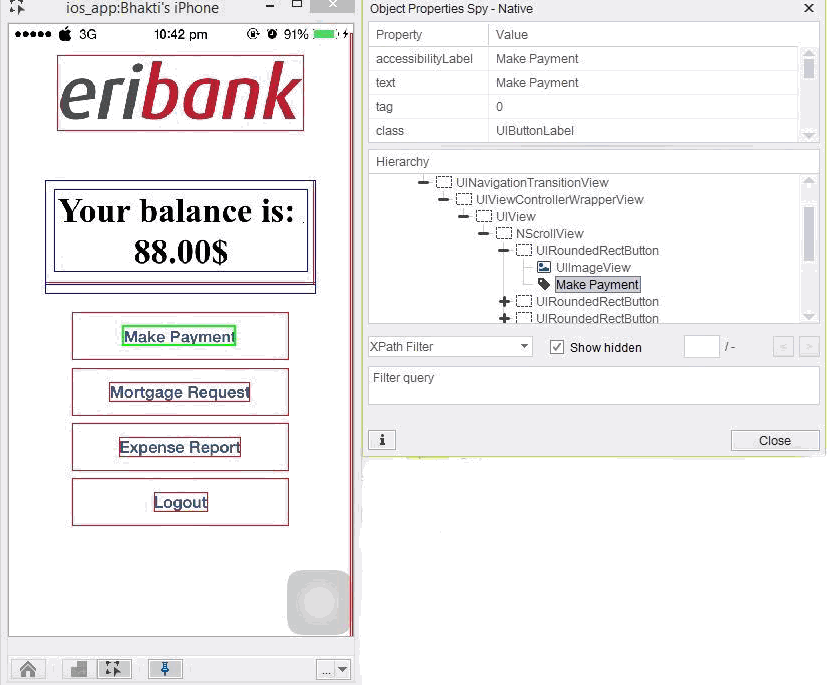
We will use the EriBank application to identify the Make Payment button using the Mortgage Request button. By this, we will make sure that the Make Payment button is above the Mortgage Request button.
Step 1: Login and navigate to the Make Payment page.
Step 2: Identify the properties of the Mortgage Request button.
Step 3: Now find the properties of the Make Payment Button.
Step 4: In the script area type in the command “Verifyin” and add the following properties:
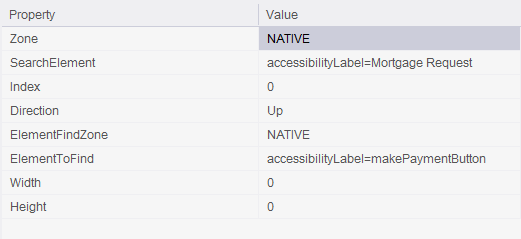
Result:

Code Examples
client.verifyIn("NATIVE", "accessibilityLabel=Mortgage Request", 0, "Up", "NATIVE", "accessibilityLabel=makePaymentButton", 0, 0);client.VerifyIn("NATIVE", "accessibilityLabel=Mortgage Request", 0, "Up", "NATIVE", "accessibilityLabel=makePaymentButton", 0, 0);client.VerifyIn "NATIVE", "accessibilityLabel=Mortgage Request", 0, "Up", "NATIVE", "accessibilityLabel=makePaymentButton", 0, 0Reportself.client.verifyIn("NATIVE", "accessibilityLabel=Mortgage Request", 0, "Up", "NATIVE", "accessibilityLabel=makePaymentButton", 0, 0)$client->verifyIn("NATIVE", "accessibilityLabel=Mortgage Request", 0, "Up", "NATIVE", "accessibilityLabel=makePaymentButton", 0, 0);