
Silk Mobile
Table of Contents (Homepage)
- Overview
- Setting Up
- Getting Started
- How To
- Connecting Devices And Emulators
- Preparing Applications For Testing
- Managing Applications
- Recording Tests
- Working With Test Commands
- Adding Commands To Your Scripts
- Object Commands
- Click
- ClickCoordinate
- ClickIn
- ClickOffset
- Drag
- ElementGetProperty
- ElementGetTableRowsCount
- ElementListPick
- ElementListSelect
- ElementListVisible
- ElementScrollToTableRow
- ElementSendText
- ElementSetProperty
- ElementSwipe
- ElementSwipeWhileNotFound
- GetAllValues
- GetElementCount
- GetElementCountIn
- GetTextIn
- IsElementBlank
- IsElementFound
- IsFoundIn
- LongClick
- RunNativeAPICall
- SendWhileNotFound
- VerifyElementFound
- VerifyElementNotFound
- VerifyIn
- WaitForElement
- WaitForElementToVanish
- GetCoordinateColor
- DragDrop
- Application Commands
- Device Commands
- Web (Hybrid) Specific Commands
- Utilities Commands
- Monitoring Commands
- Configuration Commands
- ExtractLanguageFiles
- SetDefaultClickDownTime
- SetDefaultTimeOut
- SetDefaultWebView
- SetDragStartDelay
- SetInKeyDelay
- SetKeyToKeyDelay
- SetLanguage
- SetLanguagePropertiesFile
- SetShowImageInReport
- SetShowPassImageInReport
- SetShowReport
- SetSpeed
- SetThrowExceptionOnFail
- SetWebAutoScroll
- StartStepsGroup
- StopStepsGroup
- TextFilter
- Miscellaneous Commands
- Controlling Element Identification Rules
- Editing Test Objects
- Executing Test Scripts
- Report Of Executed Test
- Working From Code Environment
- Continuous Integration
- Layout Verification Tests
- Use Device Vitals Monitors
- Troubleshooting
- Terminology
Run
String Run(String command)
|
|

Description
Run adb commands or other device shell commands.
Parameters
-
Command : The command to run
Usage
The 'Run' command provides you the ability to run many commands for advanced capabilities.
The following example will demonstrate how to get the version of the device.
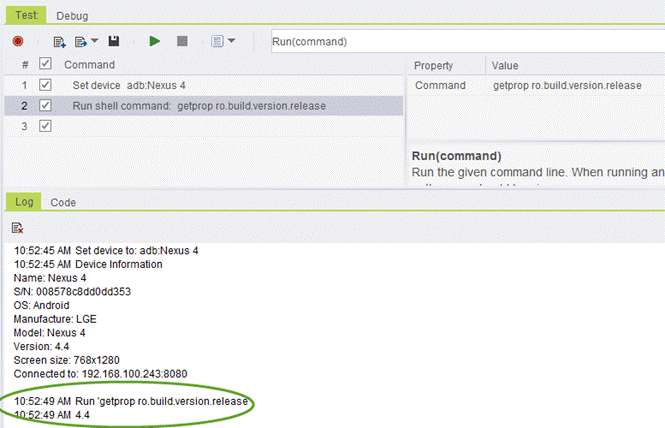
We will use the command getprop ro.build.version.release.
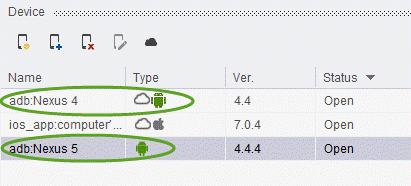
Step 1: Devices one is connected through cloud (Nexus 4) and other is connected locally via USB (Nexus 5).
Step 2: Getting the version number from cloud device (Nexus 4).
Step 3: Getting the version from the physically connected devices via USB (Nexus 5).

Code Examples
client.run("adb shell am start -a android.settings._SETTINGS")client.run("adb shell am start -a android.settings.WIFI_SETTINGS")client.run("adb shell input keyevent "KEYCODE_VOLUME_UP"')client.run("adb shell input keyevent "KEYCODE_VOLUME_DOWN"')client.run("adb shell am start -a android.intent.action.CALL -d tel:+6512345678");