
Silk Mobile
Table of Contents (Homepage)
- Overview
- Setting Up
- Getting Started
- How To
- Connecting Devices And Emulators
- Preparing Applications For Testing
- Managing Applications
- Recording Tests
- Working With Test Commands
- Adding Commands To Your Scripts
- Object Commands
- Click
- ClickCoordinate
- ClickIn
- ClickOffset
- Drag
- ElementGetProperty
- ElementGetTableRowsCount
- ElementListPick
- ElementListSelect
- ElementListVisible
- ElementScrollToTableRow
- ElementSendText
- ElementSetProperty
- ElementSwipe
- ElementSwipeWhileNotFound
- GetAllValues
- GetElementCount
- GetElementCountIn
- GetTextIn
- IsElementBlank
- IsElementFound
- IsFoundIn
- LongClick
- RunNativeAPICall
- SendWhileNotFound
- VerifyElementFound
- VerifyElementNotFound
- VerifyIn
- WaitForElement
- WaitForElementToVanish
- GetCoordinateColor
- DragDrop
- Application Commands
- Device Commands
- Web (Hybrid) Specific Commands
- Utilities Commands
- Monitoring Commands
- Configuration Commands
- ExtractLanguageFiles
- SetDefaultClickDownTime
- SetDefaultTimeOut
- SetDefaultWebView
- SetDragStartDelay
- SetInKeyDelay
- SetKeyToKeyDelay
- SetLanguage
- SetLanguagePropertiesFile
- SetShowImageInReport
- SetShowPassImageInReport
- SetShowReport
- SetSpeed
- SetThrowExceptionOnFail
- SetWebAutoScroll
- StartStepsGroup
- StopStepsGroup
- TextFilter
- Miscellaneous Commands
- Controlling Element Identification Rules
- Editing Test Objects
- Executing Test Scripts
- Report Of Executed Test
- Working From Code Environment
- Continuous Integration
- Layout Verification Tests
- Use Device Vitals Monitors
- Troubleshooting
- Terminology
ClickCoordinate
void ClickCoordinate(X, Y, ClickCount)
|
|
|
|
|
|
|






Description
Click in window X,Y offset
Parameters
-
X: Horizontal Offset from the Element in screen pixels (can use P2cx to convert screen percentage to pixels)
-
Y: Vertical Offset from the Element in screen pixels (can use P2cy to convert screen percentage to pixels)
-
Click Count: Number of Clicks
Usage
If for some reason, you want to click on a specific coordinates on the screen instead of an object you can use the "ClickCoordinate" command.
Scenario:
We will use the facebook website and will use the clickCoordinate command to click on the 'add friend' button.
To get the correct coordinates, we will use the offline tab (Capture Scene) and will get the coordinates from a screenshot we captured (Width/Height).
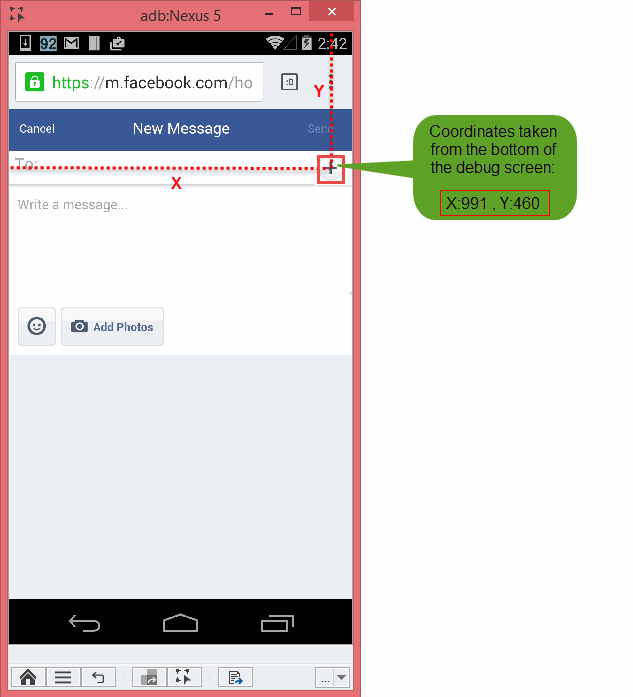
Parameters:
-
X: will be set to991
-
Y: 460
-
Click count: will be set to 1
Code Examples
client.clickCoordinate(991, 460, 1);client.ClickCoordinate(991, 460, 1);client.ClickCoordinate 991, 460, 1Reportself.client.clickCoordinate(991, 460, 1)$client->clickCoordinate(991, 460, 1);