
Silk Mobile
Table of Contents (Homepage)
- Overview
- Setting Up
- Getting Started
- How To
- Connecting Devices And Emulators
- Preparing Applications For Testing
- Managing Applications
- Recording Tests
- Working With Test Commands
- Adding Commands To Your Scripts
- Object Commands
- Click
- ClickCoordinate
- ClickIn
- ClickOffset
- Drag
- ElementGetProperty
- ElementGetTableRowsCount
- ElementListPick
- ElementListSelect
- ElementListVisible
- ElementScrollToTableRow
- ElementSendText
- ElementSetProperty
- ElementSwipe
- ElementSwipeWhileNotFound
- GetAllValues
- GetElementCount
- GetElementCountIn
- GetTextIn
- IsElementBlank
- IsElementFound
- IsFoundIn
- LongClick
- RunNativeAPICall
- SendWhileNotFound
- VerifyElementFound
- VerifyElementNotFound
- VerifyIn
- WaitForElement
- WaitForElementToVanish
- GetCoordinateColor
- DragDrop
- Application Commands
- Device Commands
- Web (Hybrid) Specific Commands
- Utilities Commands
- Monitoring Commands
- Configuration Commands
- ExtractLanguageFiles
- SetDefaultClickDownTime
- SetDefaultTimeOut
- SetDefaultWebView
- SetDragStartDelay
- SetInKeyDelay
- SetKeyToKeyDelay
- SetLanguage
- SetLanguagePropertiesFile
- SetShowImageInReport
- SetShowPassImageInReport
- SetShowReport
- SetSpeed
- SetThrowExceptionOnFail
- SetWebAutoScroll
- StartStepsGroup
- StopStepsGroup
- TextFilter
- Miscellaneous Commands
- Controlling Element Identification Rules
- Editing Test Objects
- Executing Test Scripts
- Report Of Executed Test
- Working From Code Environment
- Continuous Integration
- Layout Verification Tests
- Use Device Vitals Monitors
- Troubleshooting
- Terminology
StopVideoRecord
StopVideoRecord()
|
|
|
|
|
|
|






Description
These commands gives you the ability to video record the test execution, and later view it as part of the generated report .
Parameters
None
Usage
The command is used after the command StartVideoRecord and stops the current recording.
When recording video, the command StopVideoRecord is called automatically in the end of the test (the generate report command).
Example:
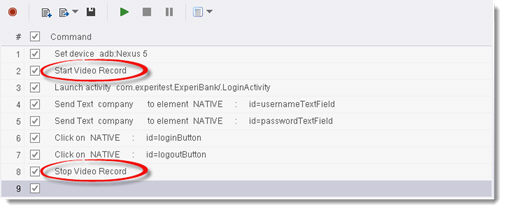
The record will start once the command StartVideoRecord is executed in the script, and will stop when the command StopVideoRecord called.
To launch the video, choose the StopVideoRecord command. This step will include the video of the execution.
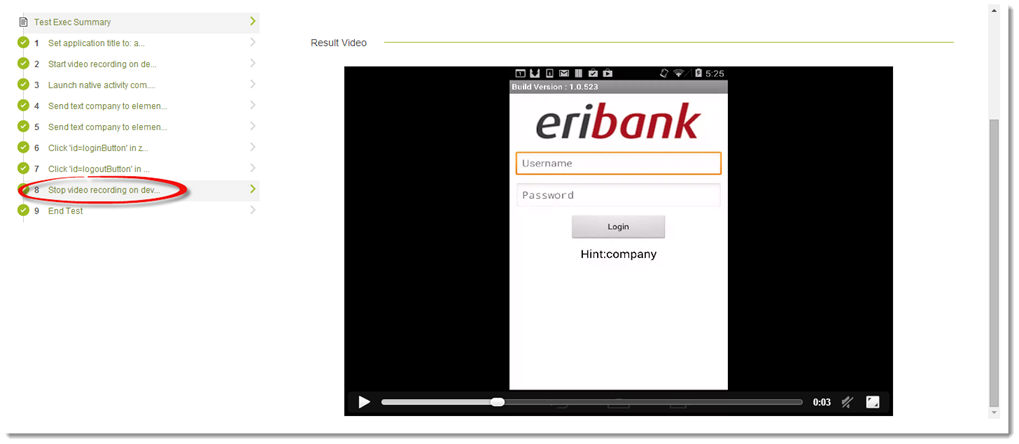
Note: There is no limitations on the number of different videos that can be generated during a single script. You can add the StartVideoRecord / StopVideoRecord commands multiple times during a script, and for each block the video will show in the report under the proper StopVideoRecord command.
Code Examples
client.startVideoRecord();client.stopVideoRecord();client.StartVideoRecord();client.StopVideoRecord();client.StartVideoRecord Reportclient.StopVideoRecord Reportself.client.startVideoRecord()self.client.stopVideoRecord()$client->startVideoRecord();$client->stopVideoRecord();