
Silk Mobile
Table of Contents (Homepage)
- Overview
- Setting Up
- Getting Started
- How To
- Connecting Devices And Emulators
- Preparing Applications For Testing
- Managing Applications
- Recording Tests
- Working With Test Commands
- Adding Commands To Your Scripts
- Object Commands
- Click
- ClickCoordinate
- ClickIn
- ClickOffset
- Drag
- ElementGetProperty
- ElementGetTableRowsCount
- ElementListPick
- ElementListSelect
- ElementListVisible
- ElementScrollToTableRow
- ElementSendText
- ElementSetProperty
- ElementSwipe
- ElementSwipeWhileNotFound
- GetAllValues
- GetElementCount
- GetElementCountIn
- GetTextIn
- IsElementBlank
- IsElementFound
- IsFoundIn
- LongClick
- RunNativeAPICall
- SendWhileNotFound
- VerifyElementFound
- VerifyElementNotFound
- VerifyIn
- WaitForElement
- WaitForElementToVanish
- GetCoordinateColor
- DragDrop
- Application Commands
- Device Commands
- Web (Hybrid) Specific Commands
- Utilities Commands
- Monitoring Commands
- Configuration Commands
- ExtractLanguageFiles
- SetDefaultClickDownTime
- SetDefaultTimeOut
- SetDefaultWebView
- SetDragStartDelay
- SetInKeyDelay
- SetKeyToKeyDelay
- SetLanguage
- SetLanguagePropertiesFile
- SetShowImageInReport
- SetShowPassImageInReport
- SetShowReport
- SetSpeed
- SetThrowExceptionOnFail
- SetWebAutoScroll
- StartStepsGroup
- StopStepsGroup
- TextFilter
- Miscellaneous Commands
- Controlling Element Identification Rules
- Editing Test Objects
- Executing Test Scripts
- Report Of Executed Test
- Working From Code Environment
- Continuous Integration
- Layout Verification Tests
- Use Device Vitals Monitors
- Troubleshooting
- Terminology
Pinch
Boolean Pinch(int inside, int X, int Y, int Radius)
|
|
|


Description
Pinch In/Out at specific location using a specific pinch radius.
Parameters
-
Inside: Boolean set the direction of the pinch.
-
True for Zoom In
-
False for Zoom Out
-
-
X: The x coordinate of the center point from top left. (can use p2cx to convert screen percentage to pixels).
-
Y: The y coordinate of the center point from top left. (can use p2cy to convert screen percentage to pixels).
-
Radius: The pinch radius in screen pixels.
Performing pinch directly on the User Interface (UI):
-
Pinch in (Zooms out): Scroll the mouse wheel down while pressing the control (CTRL) key.
-
Pinch out (Zooms in): Scroll the mouse whee up while pressing the control (CTRL) key.
Usage
Following example demonstrates how the pinch command works:
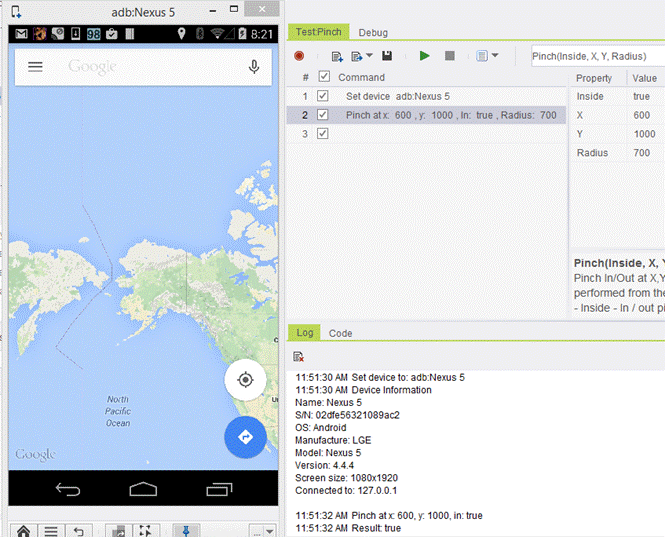
We will zoom in the Google maps:
Parameters:
-
Inside: set to- true
-
X: set to - 600
-
Y: set to - 1000
-
Radius: set to – 700
Before running the script:
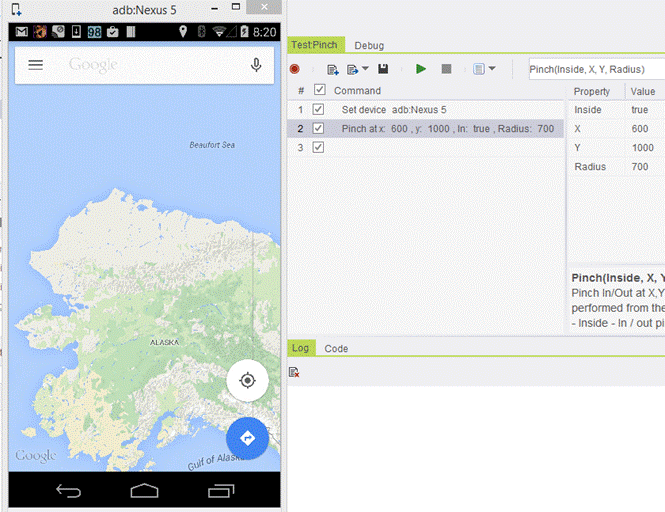
After executing the script:
Code Examples
if(client.pinch(true, 600, 1000, 700)){// If statement}if(client.Pinch(true, 600, 1000, 700)){// If statement}If StrComp (client.Pinch ( true, 600, 1000, 700 ), "True") = 0 Then Report 'If statementElse ReportEnd Ifif(self.client.pinch(True, 600, 1000, 700)):# If statementpassif($client->pinch(1, 600, 1000, 700)){# If statement}