
Silk Mobile
Table of Contents (Homepage)
- Overview
- Setting Up
- Getting Started
- How To
- Connecting Devices And Emulators
- Preparing Applications For Testing
- Managing Applications
- Recording Tests
- Working With Test Commands
- Adding Commands To Your Scripts
- Object Commands
- Click
- ClickCoordinate
- ClickIn
- ClickOffset
- Drag
- ElementGetProperty
- ElementGetTableRowsCount
- ElementListPick
- ElementListSelect
- ElementListVisible
- ElementScrollToTableRow
- ElementSendText
- ElementSetProperty
- ElementSwipe
- ElementSwipeWhileNotFound
- GetAllValues
- GetElementCount
- GetElementCountIn
- GetTextIn
- IsElementBlank
- IsElementFound
- IsFoundIn
- LongClick
- RunNativeAPICall
- SendWhileNotFound
- VerifyElementFound
- VerifyElementNotFound
- VerifyIn
- WaitForElement
- WaitForElementToVanish
- GetCoordinateColor
- DragDrop
- Application Commands
- Device Commands
- Web (Hybrid) Specific Commands
- Utilities Commands
- Monitoring Commands
- Configuration Commands
- ExtractLanguageFiles
- SetDefaultClickDownTime
- SetDefaultTimeOut
- SetDefaultWebView
- SetDragStartDelay
- SetInKeyDelay
- SetKeyToKeyDelay
- SetLanguage
- SetLanguagePropertiesFile
- SetShowImageInReport
- SetShowPassImageInReport
- SetShowReport
- SetSpeed
- SetThrowExceptionOnFail
- SetWebAutoScroll
- StartStepsGroup
- StopStepsGroup
- TextFilter
- Miscellaneous Commands
- Controlling Element Identification Rules
- Editing Test Objects
- Executing Test Scripts
- Report Of Executed Test
- Working From Code Environment
- Continuous Integration
- Layout Verification Tests
- Use Device Vitals Monitors
- Troubleshooting
- Terminology
ReleaseDevice
Release(DeviceName, ReleaseAgent, RemoveFromDeviceList, ReleaseFromCloud)
|
|
|
|
|




Description
This command gives the user several options on how to automate several common scenarios when finished testing on a specific device. The option to release the execution port is closely related to the Executor Add-On feature.
Note: For more about the executor add-on - Click here.
Parameters
-
DeviceName: The name of the device you wish to release.
-
Special cases:
-
"" = The active device will be released
-
"*" = all devices that were locked by the user will be released (in case of serial execution)
-
-
ReleaseAgent: Deprecated Boolean parameter. If set to true or false will release the execution agent the device was using.
-
RemoveFromDeviceList: Boolean parameter. If set to true, will remove the device from the connected devices menu.
-
ReleaseFromCloud: Boolean parameter. If set to true, will release the device from the current user in the Cloud.
Usage
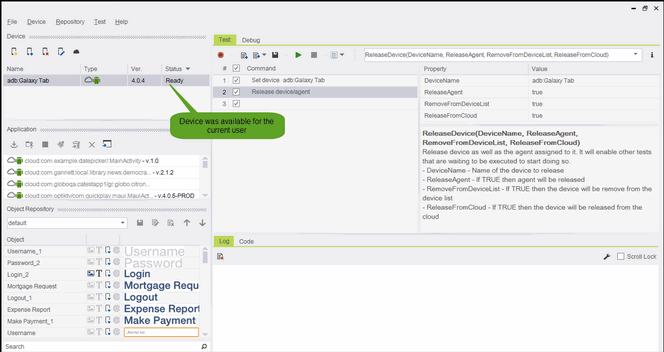
We will use this command to release the tested device.
Parameters:
-
DeviceName: “adb:Galaxy Tab”
-
ReleaseAgent: True
-
RemoveFromDeviceList: True
-
ReleaseFromCloud: True
Result:
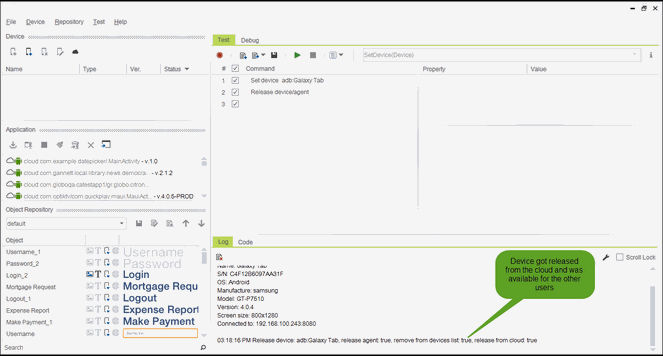
Device will be released from the cloud. Also it will be removed from the device list as well. The agent which was being used will also freed.
Code Examples
client.releaseDevice("adb:Galaxy Tab", true, true, true);client.ReleaseDevice("adb:Galaxy Tab", true, true, true);client.ReleaseDevice "adb:Galaxy Tab", true, true, trueReportself.client.releaseDevice("adb:Galaxy Tab", True, True, True)$client->releaseDevice("adb:Galaxy Tab", 1, 1, 1);