
Silk Mobile
Table of Contents (Homepage)
- Overview
- Setting Up
- Getting Started
- How To
- Connecting Devices And Emulators
- Preparing Applications For Testing
- Managing Applications
- Recording Tests
- Working With Test Commands
- Adding Commands To Your Scripts
- Object Commands
- Click
- ClickCoordinate
- ClickIn
- ClickOffset
- Drag
- ElementGetProperty
- ElementGetTableRowsCount
- ElementListPick
- ElementListSelect
- ElementListVisible
- ElementScrollToTableRow
- ElementSendText
- ElementSetProperty
- ElementSwipe
- ElementSwipeWhileNotFound
- GetAllValues
- GetElementCount
- GetElementCountIn
- GetTextIn
- IsElementBlank
- IsElementFound
- IsFoundIn
- LongClick
- RunNativeAPICall
- SendWhileNotFound
- VerifyElementFound
- VerifyElementNotFound
- VerifyIn
- WaitForElement
- WaitForElementToVanish
- GetCoordinateColor
- DragDrop
- Application Commands
- Device Commands
- Web (Hybrid) Specific Commands
- Utilities Commands
- Monitoring Commands
- Configuration Commands
- ExtractLanguageFiles
- SetDefaultClickDownTime
- SetDefaultTimeOut
- SetDefaultWebView
- SetDragStartDelay
- SetInKeyDelay
- SetKeyToKeyDelay
- SetLanguage
- SetLanguagePropertiesFile
- SetShowImageInReport
- SetShowPassImageInReport
- SetShowReport
- SetSpeed
- SetThrowExceptionOnFail
- SetWebAutoScroll
- StartStepsGroup
- StopStepsGroup
- TextFilter
- Miscellaneous Commands
- Controlling Element Identification Rules
- Editing Test Objects
- Executing Test Scripts
- Report Of Executed Test
- Working From Code Environment
- Continuous Integration
- Layout Verification Tests
- Use Device Vitals Monitors
- Troubleshooting
- Terminology
TextFilter
|
|
|
|
|
|
|






Description
Designed command to improve TEXT (OCR) recognition abilities either dynamically or through the repository.
Command will filter the color of the text and will avoid other colors on the background. It will precede the actual command to come into affect.
Parameters
-
Color: Color of text to filter - input is is a string Hexadecimal 32 bits format. For example '0xFFFFFF' will refer to the white color, '0x0' refers to black)
-
Sensitivity: Set the filter sensitivity range from "0" to "100" where "100" is no sensitivity at all, and "0" is complete sensitivity. It is not recommended to give value of above 15.
Usage
When there is a text which is overshadowed by its background color and user wants to use TEXT recognition to perform an action on it.
Example
Scenario: In the screen below, we will see how can we use text filter in order to identify text effectively.
In this example, if we want to validate text “Vibrate when ringing” present on the screen, Using TEXT recognition, then we will use command :
client.isElementFound("TEXT", "Vibrate when ringing",0)Note: It is much more recommended to use Native recognition using the Non-instrumentation feature.
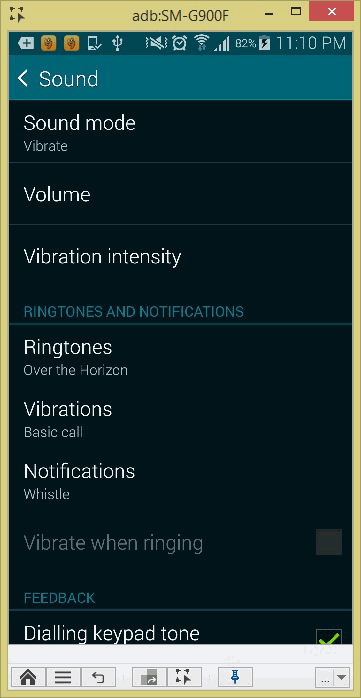
Because of the dark background color compare to the color of the text, the verification may fail. We can improve it by using textFilter command.
How to get the color of the text
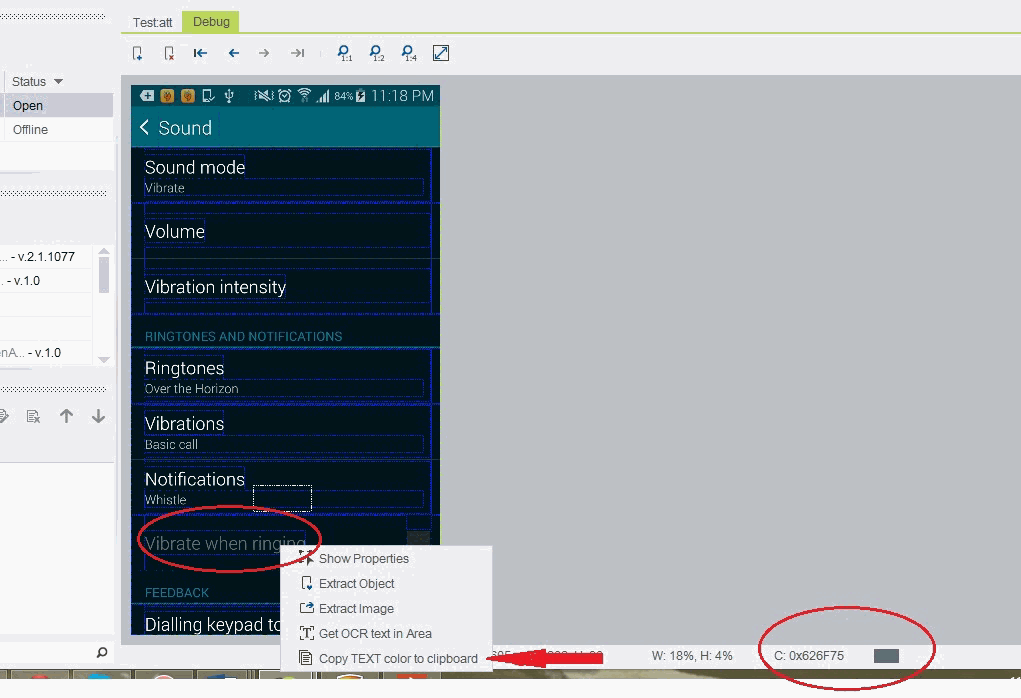
Use the debug tab.
Capture the scene of the reflection from where you want to fetch the text color.
Hover your mouse icon on the color that you want to fetch and perform Right-click->Copy TEXT color to Clipboard. See screenshot above.
In that case, the textFilter command should be:
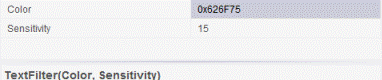
Now, when we will use TextFilter command in conjunction, Silk Mobile will be able to identify “Vibrate when ringing” text

Code Examples
client.textFilter("0x626F75", 15); if(client.isElementFound("TEXT", "Vibrate when ringing", 0)){ // If statement }driver.client.textFilter("0x626F75", 15); if(driver.client.isElementFound("TEXT", "Vibrate when ringing", 0)){ // If statement }client.textFilter("0x626F75", 15); if(client.isElementFound("TEXT", "Vibrate when ringing", 0)){ // If statement }self.client.textFilter("0x626F75", 15) if(self.client.isElementFound("TEXT", "Vibrate when ringing", 0)): # If statement pass$client->textFilter("0x626F75", 15);if($client->isElementFound("TEXT", "Vibrate when ringing", 0)){ # If statement}