
Silk Mobile
Table of Contents (Homepage)
- Overview
- Setting Up
- Getting Started
- How To
- Connecting Devices And Emulators
- Preparing Applications For Testing
- Managing Applications
- Recording Tests
- Working With Test Commands
- Adding Commands To Your Scripts
- Object Commands
- Click
- ClickCoordinate
- ClickIn
- ClickOffset
- Drag
- ElementGetProperty
- ElementGetTableRowsCount
- ElementListPick
- ElementListSelect
- ElementListVisible
- ElementScrollToTableRow
- ElementSendText
- ElementSetProperty
- ElementSwipe
- ElementSwipeWhileNotFound
- GetAllValues
- GetElementCount
- GetElementCountIn
- GetTextIn
- IsElementBlank
- IsElementFound
- IsFoundIn
- LongClick
- RunNativeAPICall
- SendWhileNotFound
- VerifyElementFound
- VerifyElementNotFound
- VerifyIn
- WaitForElement
- WaitForElementToVanish
- GetCoordinateColor
- DragDrop
- Application Commands
- Device Commands
- Web (Hybrid) Specific Commands
- Utilities Commands
- Monitoring Commands
- Configuration Commands
- ExtractLanguageFiles
- SetDefaultClickDownTime
- SetDefaultTimeOut
- SetDefaultWebView
- SetDragStartDelay
- SetInKeyDelay
- SetKeyToKeyDelay
- SetLanguage
- SetLanguagePropertiesFile
- SetShowImageInReport
- SetShowPassImageInReport
- SetShowReport
- SetSpeed
- SetThrowExceptionOnFail
- SetWebAutoScroll
- StartStepsGroup
- StopStepsGroup
- TextFilter
- Miscellaneous Commands
- Controlling Element Identification Rules
- Editing Test Objects
- Executing Test Scripts
- Report Of Executed Test
- Working From Code Environment
- Continuous Integration
- Layout Verification Tests
- Use Device Vitals Monitors
- Troubleshooting
- Terminology
ElementScrollToTableRow
ElementScrollToTableRow(Zone, TableLocator, TableIndex, RowIndex)
|
|
|
|



Description
This command allows you to scroll a row in a table or list to the top of screen .
Parameters
-
Zone - Select the Zone in which the table is stored. If you set the value of the Zone to "default" or to some user-defined Zone name, the row scrolled to can be in a table stored in Silk Mobile’s repository.
-
TableLocator - Locator of the table class element
-
TableIndex - Index in case of multiple tables on the screen
-
RowIndex - The number of the row to scroll to
Usage
Scenario : In the following example we will use the ElementScrollToTableRowCommand in order to get the 20th row of the Eri-Bank Application country list to the top of the screen.
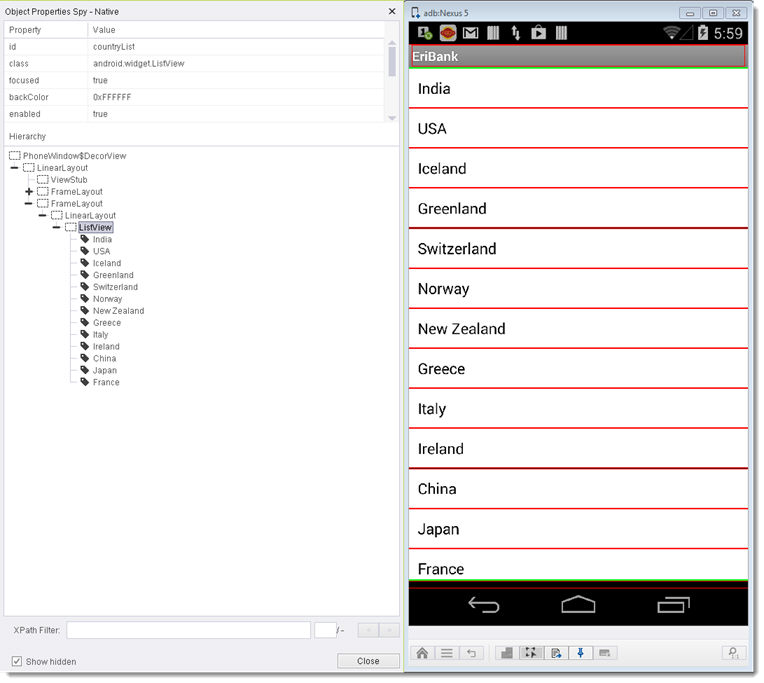
Parameters:
-
TableLocator: Table class locator - will be set to xpath=//*[@id='countryList']
-
TableIndex: Table index - will be set to 0
-
RowIndex: Will be set to 20
Command Results:
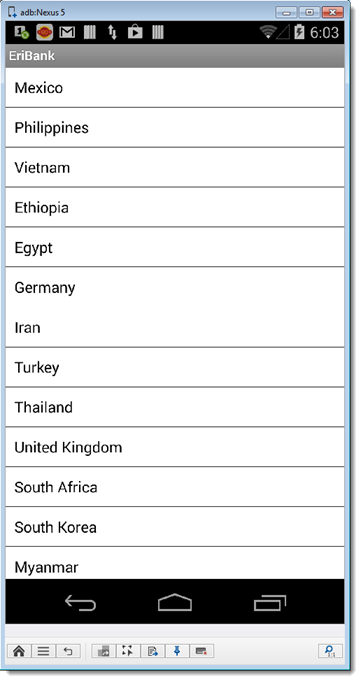
Despite not even appearing as an element in the object spy at the starting point of the command, the 20th country in the list (Mexico) will now appear at the top of the screen.
Code Examples
client.elementScrollToTableRow("NATIVE", "xpath=//*[@id='countryList']", 0, 20);client.ElementScrollToTableRow("NATIVE", "xpath=//*[@id='countryList']", 0, 20);client.ElementScrollToTableRow "NATIVE", "xpath=//*[@id='countryList']", 0, 20Reportself.client.elementScrollToTableRow("NATIVE", "xpath=//*[@id='countryList']", 0, 20)$client->elementScrollToTableRow("NATIVE", "xpath=//*[\@id='countryList']", 0, 20);