
Silk Mobile
Table of Contents (Homepage)
- Overview
- Setting Up
- Getting Started
- How To
- Connecting Devices And Emulators
- Preparing Applications For Testing
- Managing Applications
- Recording Tests
- Working With Test Commands
- Adding Commands To Your Scripts
- Object Commands
- Click
- ClickCoordinate
- ClickIn
- ClickOffset
- Drag
- ElementGetProperty
- ElementGetTableRowsCount
- ElementListPick
- ElementListSelect
- ElementListVisible
- ElementScrollToTableRow
- ElementSendText
- ElementSetProperty
- ElementSwipe
- ElementSwipeWhileNotFound
- GetAllValues
- GetElementCount
- GetElementCountIn
- GetTextIn
- IsElementBlank
- IsElementFound
- IsFoundIn
- LongClick
- RunNativeAPICall
- SendWhileNotFound
- VerifyElementFound
- VerifyElementNotFound
- VerifyIn
- WaitForElement
- WaitForElementToVanish
- GetCoordinateColor
- DragDrop
- Application Commands
- Device Commands
- Web (Hybrid) Specific Commands
- Utilities Commands
- Monitoring Commands
- Configuration Commands
- ExtractLanguageFiles
- SetDefaultClickDownTime
- SetDefaultTimeOut
- SetDefaultWebView
- SetDragStartDelay
- SetInKeyDelay
- SetKeyToKeyDelay
- SetLanguage
- SetLanguagePropertiesFile
- SetShowImageInReport
- SetShowPassImageInReport
- SetShowReport
- SetSpeed
- SetThrowExceptionOnFail
- SetWebAutoScroll
- StartStepsGroup
- StopStepsGroup
- TextFilter
- Miscellaneous Commands
- Controlling Element Identification Rules
- Editing Test Objects
- Executing Test Scripts
- Report Of Executed Test
- Working From Code Environment
- Continuous Integration
- Layout Verification Tests
- Use Device Vitals Monitors
- Troubleshooting
- Terminology
Comment
Comment(Comment)
|
|
|
|
|
|
|






Description
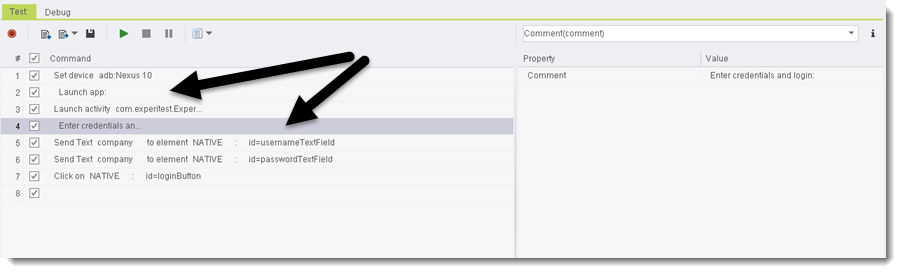
This command gives you the option to add free-writing comment lines in the Silk Mobile commands tab.
Note: The comments will also be exported to all 3rd party code environments.
Parameters
-
Comment
Usage
Example: (The arrows point to the comment lines):
Code Examples
Java Example
@Test public void testUntitled(){ client.setDevice("adb:Nexus 10"); // Launch app: client.launch("com.experitest.ExperiBank/.LoginActivity", true, false); // Enter credentials and login client.elementSendText("NATIVE", "id=usernameTextField", 0, "company"); client.elementSendText("NATIVE", "id=passwordTextField", 0, "company"); client.click("NATIVE", "id=loginButton", 0, 1); }C# Example
[Test] public void TestUntitled() { client.SetDevice("adb:Nexus 10"); // Launch app: client.Launch("com.experitest.ExperiBank/.LoginActivity", true, false); // Enter credentials and login client.ElementSendText("NATIVE", "id=usernameTextField", 0, "company"); client.ElementSendText("NATIVE", "id=passwordTextField", 0, "company"); client.Click("NATIVE", "id=loginButton", 0, 1); }VBScript Example
Set client = DotNetFactory.CreateInstance("experitestClient.Client", "C:\\Users\\user_12\\Desktop\\8.5.61\\silkmobile\\clients\\C#\\imageClient.dll", "127.0.0.1", 8889, true)client.SetProjectBaseDirectory "C:\\Users\\user_12\\workspace\\project2"client.SetDevice "adb:Nexus 10"Report' Launch app:client.Launch "com.experitest.ExperiBank/.LoginActivity", true, falseReport' Enter credentials and loginclient.ElementSendText "NATIVE", "id=usernameTextField", 0, "company"Reportclient.ElementSendText "NATIVE", "id=passwordTextField", 0, "company"Reportclient.Click "NATIVE", "id=loginButton", 0, 1ReportPython Example
def testUntitled(self): self.client.setDevice("adb:Nexus 10") # Launch app: self.client.launch("com.experitest.ExperiBank/.LoginActivity", True, False) # Enter credentials and login self.client.elementSendText("NATIVE", "id=usernameTextField", 0, "company") self.client.elementSendText("NATIVE", "id=passwordTextField", 0, "company") self.client.click("NATIVE", "id=loginButton", 0, 1)Perl Example
$client->setDevice("adb:Nexus 10"); # Launch app:$client->launch("com.experitest.ExperiBank/.LoginActivity", 1, 0); # Enter credentials and login$client->elementSendText("NATIVE", "id=usernameTextField", 0, "company");$client->elementSendText("NATIVE", "id=passwordTextField", 0, "company");$client->click("NATIVE", "id=loginButton", 0, 1);
Created by Microfocus.