
Silk Mobile
Table of Contents (Homepage)
- Overview
- Setting Up
- Getting Started
- How To
- Connecting Devices And Emulators
- Preparing Applications For Testing
- Managing Applications
- Recording Tests
- Working With Test Commands
- Adding Commands To Your Scripts
- Object Commands
- Click
- ClickCoordinate
- ClickIn
- ClickOffset
- Drag
- ElementGetProperty
- ElementGetTableRowsCount
- ElementListPick
- ElementListSelect
- ElementListVisible
- ElementScrollToTableRow
- ElementSendText
- ElementSetProperty
- ElementSwipe
- ElementSwipeWhileNotFound
- GetAllValues
- GetElementCount
- GetElementCountIn
- GetTextIn
- IsElementBlank
- IsElementFound
- IsFoundIn
- LongClick
- RunNativeAPICall
- SendWhileNotFound
- VerifyElementFound
- VerifyElementNotFound
- VerifyIn
- WaitForElement
- WaitForElementToVanish
- GetCoordinateColor
- DragDrop
- Application Commands
- Device Commands
- Web (Hybrid) Specific Commands
- Utilities Commands
- Monitoring Commands
- Configuration Commands
- ExtractLanguageFiles
- SetDefaultClickDownTime
- SetDefaultTimeOut
- SetDefaultWebView
- SetDragStartDelay
- SetInKeyDelay
- SetKeyToKeyDelay
- SetLanguage
- SetLanguagePropertiesFile
- SetShowImageInReport
- SetShowPassImageInReport
- SetShowReport
- SetSpeed
- SetThrowExceptionOnFail
- SetWebAutoScroll
- StartStepsGroup
- StopStepsGroup
- TextFilter
- Miscellaneous Commands
- Controlling Element Identification Rules
- Editing Test Objects
- Executing Test Scripts
- Report Of Executed Test
- Working From Code Environment
- Continuous Integration
- Layout Verification Tests
- Use Device Vitals Monitors
- Troubleshooting
- Terminology
CaptureElement
void captureElement(name, x, y, width, height, similarity)
Note: This command is available only from a code environment.
|
|
|
|
|
|
|






Description
The command enables you to capture a screenshot of a part of the device’s screen in a given time and create a new element in zone "runtime" that you can use in later steps of your scripts.
Parameters
-
String name: Name that will be given to the captured Element
-
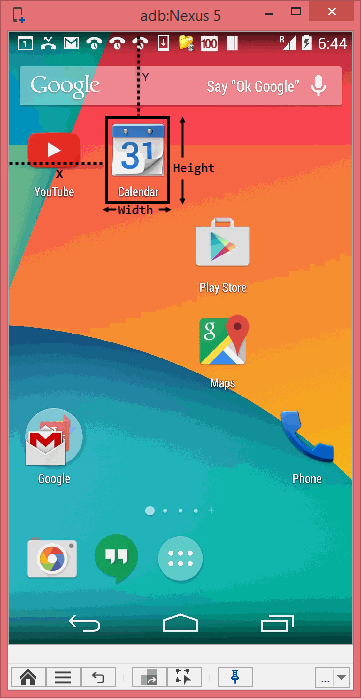
Int X: First point X
-
Int Y: First point Y
-
Width: Width of the captured area
-
Height: Height of the captured area
-
Similarity: Integer number between 80-100. Enables to define the tolerance of changes when searching for the image.
Usage
Designed command for image recognition during runtime.
This can be highly useful when the elements on the screen changes very often or for image comparisons.
Scenario: We will use captureElement command to capture the Calendar icon image during runtime and then click on the icon using this image.
Parameters:
-
name: Will be set to Calendar
-
X: will be set to 275
-
Y: will be set to 255
-
Width: will be set to 264
-
Height: will be set to 299
-
Similarity: will be set to 100
The values of the coordinates were retrieved using the offline tab.
Once executed, new object is created on zone runtime with the name Calendar.
Which can be used to identify the element in order to operate on it.
We will add a click command to click on the icon
Code:
//package <set your test package>;import com.experitest.client.*;import org.junit.*;/** * **/public class captureElement { private String host = "localhost"; private int port = 8889; private String projectBaseDirectory = "C:\\Users\\user_12\\workspace\\project2"; protected Client client = null; @Before public void setUp(){ client = new Client(host, port, true); client.setProjectBaseDirectory(projectBaseDirectory); client.setReporter("xml", "reports", "EriBank"); } @Test public void testcaptureElement(){ client.setDevice("adb:Nexus 5"); client.captureElement("Calendar", 275, 255, 264, 299, 100) client.click("runtime", "Calendar", 0, 1) } @After public void tearDown(){// Generates a report of the test case.// For more information - http://supportline.microfocus.com/Documentation/books/ASQ/SilkMobile/90/help/Report+Of+Executed+Test client.generateReport(false);// Releases the client so that other clients can approach the agent in the near future. client.releaseClient(); }}Code Examples
client.captureElement("Calendar", 275, 255, 264, 299, 100)client.click("runtime", "Calendar", 0, 1)client.captureElement("Calendar", 275, 255, 264, 299, 100)client.click("runtime", "Calendar", 0, 1)self.client.captureElement("Calendar", 275, 255, 264, 299, 100)self.client.click("runtime", "Calendar", 0, 1)