
Silk Mobile
Table of Contents (Homepage)
- Overview
- Setting Up
- Getting Started
- How To
- Connecting Devices And Emulators
- Preparing Applications For Testing
- Managing Applications
- Recording Tests
- Working With Test Commands
- Adding Commands To Your Scripts
- Object Commands
- Click
- ClickCoordinate
- ClickIn
- ClickOffset
- Drag
- ElementGetProperty
- ElementGetTableRowsCount
- ElementListPick
- ElementListSelect
- ElementListVisible
- ElementScrollToTableRow
- ElementSendText
- ElementSetProperty
- ElementSwipe
- ElementSwipeWhileNotFound
- GetAllValues
- GetElementCount
- GetElementCountIn
- GetTextIn
- IsElementBlank
- IsElementFound
- IsFoundIn
- LongClick
- RunNativeAPICall
- SendWhileNotFound
- VerifyElementFound
- VerifyElementNotFound
- VerifyIn
- WaitForElement
- WaitForElementToVanish
- GetCoordinateColor
- DragDrop
- Application Commands
- Device Commands
- Web (Hybrid) Specific Commands
- Utilities Commands
- Monitoring Commands
- Configuration Commands
- ExtractLanguageFiles
- SetDefaultClickDownTime
- SetDefaultTimeOut
- SetDefaultWebView
- SetDragStartDelay
- SetInKeyDelay
- SetKeyToKeyDelay
- SetLanguage
- SetLanguagePropertiesFile
- SetShowImageInReport
- SetShowPassImageInReport
- SetShowReport
- SetSpeed
- SetThrowExceptionOnFail
- SetWebAutoScroll
- StartStepsGroup
- StopStepsGroup
- TextFilter
- Miscellaneous Commands
- Controlling Element Identification Rules
- Editing Test Objects
- Executing Test Scripts
- Report Of Executed Test
- Working From Code Environment
- Continuous Integration
- Layout Verification Tests
- Use Device Vitals Monitors
- Troubleshooting
- Terminology
GetAllValues
GetAllValues (String Zone, String Element, String Property)
|
|
|
|
|




Description
Get all the values of a certain property from all the existing elements. Possible properties are all the methods available on the Object spy for the page.
Parameters
Usage
Scenario: This command will be useful when you are looking to pull a certain property from all the elements on a list or table. By using an example element as a reference this command will return the property of all the other elements.
Example: In the following example we will use the demo application EriBank. We will extract the text values of all the elements in the following list of countries.
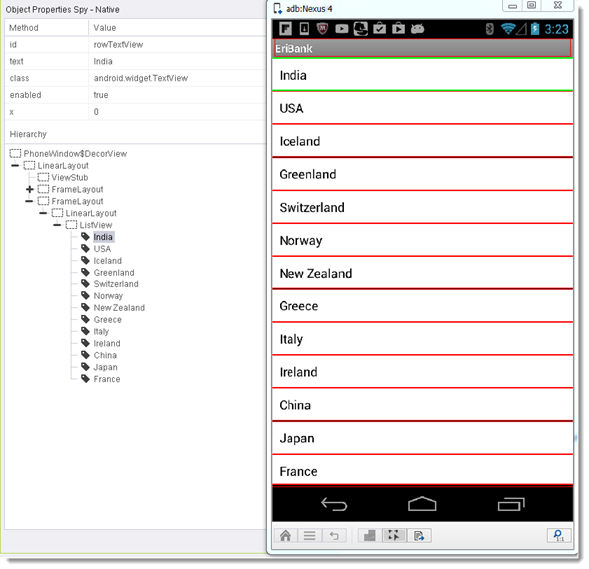
Command usage: All the rows on the list have the same ID. We are going to get the text of all rows using this ID.
Parameters:
-
Zone - Select the example element's zone - in this case NATIVE.
-
Element - Element element's identifier. We will use an x-path query to identify a row in the table: xpath=//*[@id='countryList']/..//*[@id='rowTextView'].
-
Property - The property or method to be extracted from the elements that meet the query. In this case text.
Results:
The command will returns an array string of all the rows visible on the screen:
India
USA
Iceland
Greenland
Switzerland
Norway
New Zealand
Greece
Italy
Ireland
China
Japan
France
Code Examples
String [] strArray = client.getAllValues("NATIVE", "xpath=//*[@id='countryList']/..//*[@id='rowTextView']", "text"); string [] strArray = client.GetAllValues("NATIVE", "xpath=//*[@id='countryList']/..//*[@id='rowTextView']", "text");client.GetAllValues "NATIVE", "id=rowTextView", "text"ListSize = Cint (client.GetLastStringArrayLength)-1ReDim GetValue(ListSize) For Iterator = 0 To (ListSize) GetValue(Iterator) = client.GetLastStringFromArray(Iterator)Next ReportNote: This is also the implementation for the command in our UFT AddOn.
var = self.client.getAllValues("NATIVE", "xpath=//*[@id='countryList']/..//*[@id='rowTextView']", "text")my @strArray = $client->getAllValues("NATIVE", "xpath=//*[\@id='countryList']/..//*[\@id='rowTextView']", "text");