Silk Mobile
Table of Contents (Homepage)
- Overview
- Setting Up
- Getting Started
- How To
- Connecting Devices And Emulators
- Preparing Applications For Testing
- Managing Applications
- Recording Tests
- Working With Test Commands
- Adding Commands To Your Scripts
- Object Commands
- Click
- ClickCoordinate
- ClickIn
- ClickOffset
- Drag
- ElementGetProperty
- ElementGetTableRowsCount
- ElementListPick
- ElementListSelect
- ElementListVisible
- ElementScrollToTableRow
- ElementSendText
- ElementSetProperty
- ElementSwipe
- ElementSwipeWhileNotFound
- GetAllValues
- GetElementCount
- GetElementCountIn
- GetTextIn
- IsElementBlank
- IsElementFound
- IsFoundIn
- LongClick
- RunNativeAPICall
- SendWhileNotFound
- VerifyElementFound
- VerifyElementNotFound
- VerifyIn
- WaitForElement
- WaitForElementToVanish
- GetCoordinateColor
- DragDrop
- Application Commands
- Device Commands
- Web (Hybrid) Specific Commands
- Utilities Commands
- Monitoring Commands
- Configuration Commands
- ExtractLanguageFiles
- SetDefaultClickDownTime
- SetDefaultTimeOut
- SetDefaultWebView
- SetDragStartDelay
- SetInKeyDelay
- SetKeyToKeyDelay
- SetLanguage
- SetLanguagePropertiesFile
- SetShowImageInReport
- SetShowPassImageInReport
- SetShowReport
- SetSpeed
- SetThrowExceptionOnFail
- SetWebAutoScroll
- StartStepsGroup
- StopStepsGroup
- TextFilter
- Miscellaneous Commands
- Controlling Element Identification Rules
- Editing Test Objects
- Executing Test Scripts
- Report Of Executed Test
- Working From Code Environment
- Continuous Integration
- Layout Verification Tests
- Use Device Vitals Monitors
- Troubleshooting
- Terminology
Index
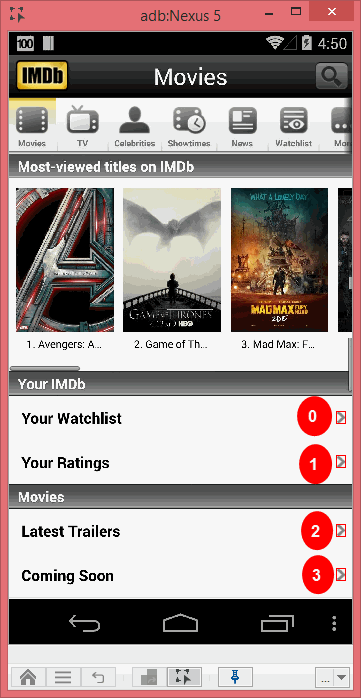
If an Element appears more than once on the screen, you can differ between its instances by index - with "0" referring to the Highest and Left-most, and as it goes Down and Right - the number grows.
Best practice: As Index differ between visible elements on the screen, it can change according to resolution or page state. It is recommended not to rely on Index to identify elements.
Good approach for element identification is to keep index value = 0 all time while finding a unique identifier for the element.
Example
For the following image Arrow which appears on the IMDB application there are 4 visible instances. To differ between them using Image recognition we will use the element from the repository with the Index as shown on the reflection.
To click the Arrow next to the ‘Your Ratings’ label we will use Index = 1.
Index on xpath
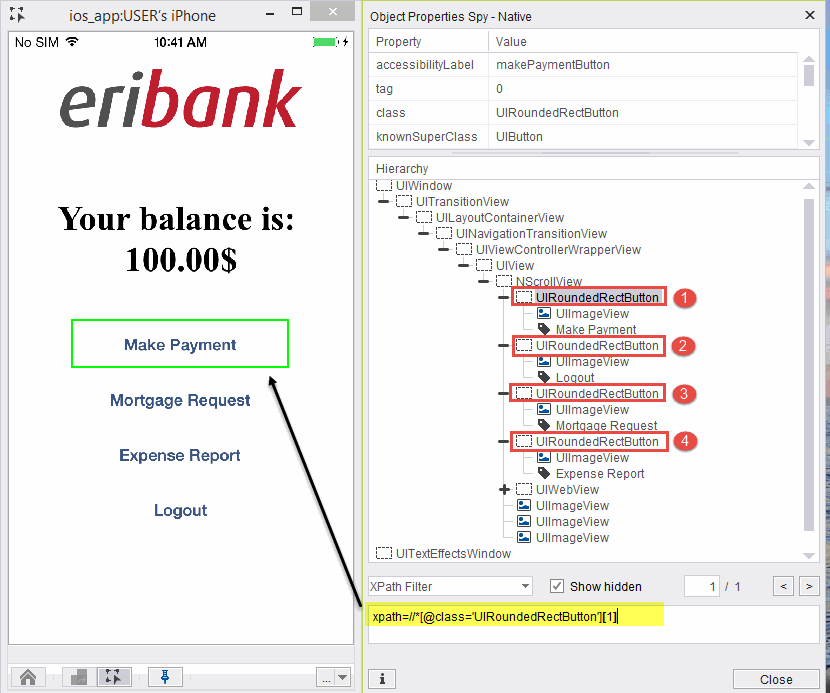
Index for xpath identification is similar in nature except it is not zero based
Example:
In the below screenshot, there are 4 buttons on the page having same parent name.
In order to identify the first button, we will use index 1.
xpath=//*[@class='UIRoundedRectButton'][1]