
Silk Mobile
Table of Contents (Homepage)
- Overview
- Setting Up
- Getting Started
- How To
- Connecting Devices And Emulators
- Preparing Applications For Testing
- Managing Applications
- Recording Tests
- Working With Test Commands
- Adding Commands To Your Scripts
- Object Commands
- Click
- ClickCoordinate
- ClickIn
- ClickOffset
- Drag
- ElementGetProperty
- ElementGetTableRowsCount
- ElementListPick
- ElementListSelect
- ElementListVisible
- ElementScrollToTableRow
- ElementSendText
- ElementSetProperty
- ElementSwipe
- ElementSwipeWhileNotFound
- GetAllValues
- GetElementCount
- GetElementCountIn
- GetTextIn
- IsElementBlank
- IsElementFound
- IsFoundIn
- LongClick
- RunNativeAPICall
- SendWhileNotFound
- VerifyElementFound
- VerifyElementNotFound
- VerifyIn
- WaitForElement
- WaitForElementToVanish
- GetCoordinateColor
- DragDrop
- Application Commands
- Device Commands
- Web (Hybrid) Specific Commands
- Utilities Commands
- Monitoring Commands
- Configuration Commands
- ExtractLanguageFiles
- SetDefaultClickDownTime
- SetDefaultTimeOut
- SetDefaultWebView
- SetDragStartDelay
- SetInKeyDelay
- SetKeyToKeyDelay
- SetLanguage
- SetLanguagePropertiesFile
- SetShowImageInReport
- SetShowPassImageInReport
- SetShowReport
- SetSpeed
- SetThrowExceptionOnFail
- SetWebAutoScroll
- StartStepsGroup
- StopStepsGroup
- TextFilter
- Miscellaneous Commands
- Controlling Element Identification Rules
- Editing Test Objects
- Executing Test Scripts
- Report Of Executed Test
- Working From Code Environment
- Continuous Integration
- Layout Verification Tests
- Use Device Vitals Monitors
- Troubleshooting
- Terminology
IsElementBlank
boolean IsElementBlank( Zone, Element, Index, ColorGroups )
|
|
|
|
|
|
|






Description
Boolean command to check if a given element contains an image or if it is blank.
-
TRUE: if blank
-
FALSE: if not.
Parameters
Usage
Scenario: The following scenario demonstrates how to use this command:
-
On the login page of eribank application, while the Username text field is empty, we will use the command to check that is blank or contains some values in the edit field.
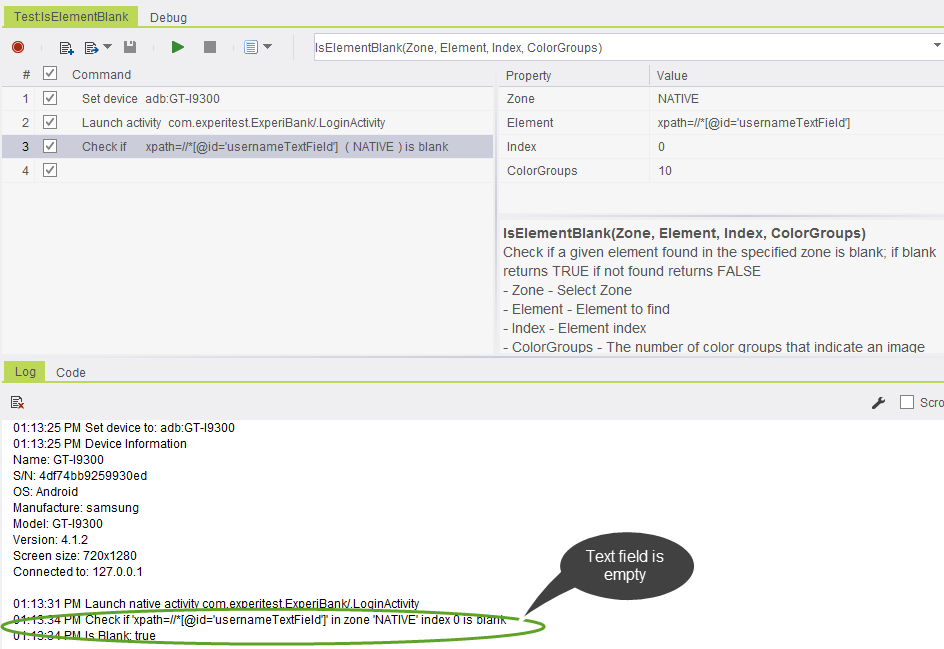
-
In this example, we have filled the text in the Username text field. Now, we will use the same command to check whether it has text or blank.
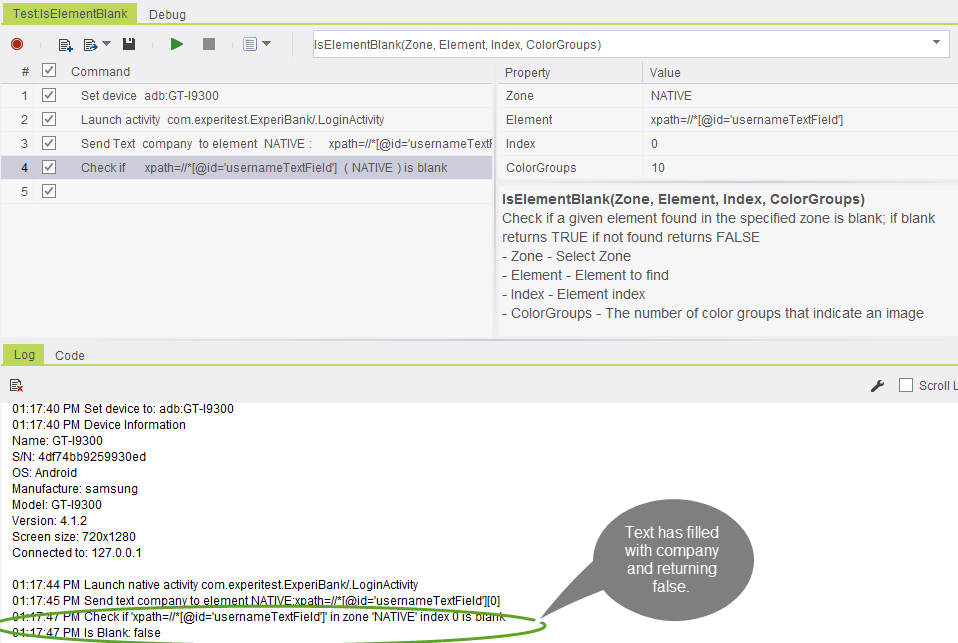 rr
rr
Code Examples
if(client.isElementBlank("NATIVE", "xpath=//*[@id='usernameTextField']", 0, 10)){// If statement}if(client.IsElementBlank("NATIVE", "xpath=//*[@id='usernameTextField']", 0, 10)){// If statement}If StrComp (client.IsElementBlank ( "NATIVE", "xpath=//*[@id='usernameTextField']", 0, 10 ), "True") = 0 Then Report 'If statementElse ReportEnd Ifif(self.client.isElementBlank("NATIVE", "xpath=//*[@id='usernameTextField']", 0, 10)):# If statementpassif($client->isElementBlank("NATIVE", "xpath=//*[\@id='usernameTextField']", 0, 10)){ # If statement}