
Silk Mobile
Table of Contents (Homepage)
- Overview
- Setting Up
- Getting Started
- How To
- Connecting Devices And Emulators
- Preparing Applications For Testing
- Managing Applications
- Recording Tests
- Working With Test Commands
- Adding Commands To Your Scripts
- Object Commands
- Click
- ClickCoordinate
- ClickIn
- ClickOffset
- Drag
- ElementGetProperty
- ElementGetTableRowsCount
- ElementListPick
- ElementListSelect
- ElementListVisible
- ElementScrollToTableRow
- ElementSendText
- ElementSetProperty
- ElementSwipe
- ElementSwipeWhileNotFound
- GetAllValues
- GetElementCount
- GetElementCountIn
- GetTextIn
- IsElementBlank
- IsElementFound
- IsFoundIn
- LongClick
- RunNativeAPICall
- SendWhileNotFound
- VerifyElementFound
- VerifyElementNotFound
- VerifyIn
- WaitForElement
- WaitForElementToVanish
- GetCoordinateColor
- DragDrop
- Application Commands
- Device Commands
- Web (Hybrid) Specific Commands
- Utilities Commands
- Monitoring Commands
- Configuration Commands
- ExtractLanguageFiles
- SetDefaultClickDownTime
- SetDefaultTimeOut
- SetDefaultWebView
- SetDragStartDelay
- SetInKeyDelay
- SetKeyToKeyDelay
- SetLanguage
- SetLanguagePropertiesFile
- SetShowImageInReport
- SetShowPassImageInReport
- SetShowReport
- SetSpeed
- SetThrowExceptionOnFail
- SetWebAutoScroll
- StartStepsGroup
- StopStepsGroup
- TextFilter
- Miscellaneous Commands
- Controlling Element Identification Rules
- Editing Test Objects
- Executing Test Scripts
- Report Of Executed Test
- Working From Code Environment
- Continuous Integration
- Layout Verification Tests
- Use Device Vitals Monitors
- Troubleshooting
- Terminology
Report
void Report(String remark, boolean status)
Or:
void Report(String pathToImage, String remark, boolean status)
Notes:
-
This command is available only from a coding environment;
-
In VB, Python, Perl and Ruby clients, the second variation of this command is called: reportWithImage;
-
In VUGen client, the variations of this command are called ic_report and ic_report_with_image, respectively, and their extra first argument is a pointer to the client structure.
|
|
|
|
|
|
|






Description
This command enhances the reports generated after test runs.
A standard report contains a line for each execution step. This command allows to customize the report by presenting meaningful information for a specific step (or a set of steps). This information can consist of a custom remark and/or an image.
Parameters
-
pathToImage: The path to the image to be displayed in the entry of the current step when a report is generated. The path can be either a full local path or a URL.
The supported URL protocols are the following:-
file://
-
http://
-
https://
-
-
remark: The custom remark; if the value of this argument can be parsed as a valid URL to an image, then this image will be integrated into the generated report.
-
status: boolean
-
True:The specific step will be marked as passed.
-
False: The specific step will be marked as failed.
-
Usage
Example Script: Report with a textual remark
Scenario: In this example, we will call command Report with a textual remark in a JUnit test:
client.report("This is a custom message inserted into the test report. It will be marked there as \"failed\"", false);client.Report("This is a custom message inserted into the test report. It will be marked there as \"failed\"", false);ic_report(&client, "This is a custom message inserted into the test report. It will be marked there as \"failed\"", IC_FALSE);self.client.report("This is a custom message inserted into the test report. It will be marked there as \"failed\"", False)$client->report("This is a custom message inserted into the test report. It will be marked there as \"failed\"", 0);
Result:
As a result, the following step will appear in the report when a report of the test is generated:
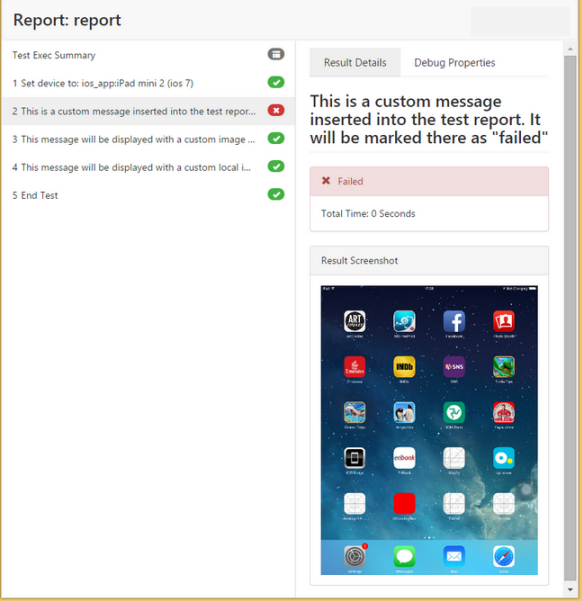
Note: The step is marked as failed owing to value false passed as the second argument (status). If a device has been set as active and its screenshot is available, the screenshot will be attached to the step report.
Example Script: Report with a custom image given as URL
Scenario: In this example, we will call the ReportWithImage command with a URL to a custom image in a test written in Python:
client.report("https://pp.vk.me/c11102/u167537414/-6/w_8fbae648.jpg", "This message will be displayed with a custom image referenced by URL", true);client.Report("https://pp.vk.me/c11102/u167537414/-6/w_8fbae648.jpg", "This message will be displayed with a custom image referenced by URL", true);ic_report_with_image(&client, "https://pp.vk.me/c11102/u167537414/-6/w_8fbae648.jpg", "This message will be displayed with a custom image referenced by URL", IC_TRUE);self.client.reportWithImage("https://pp.vk.me/c11102/u167537414/-6/w_8fbae648.jpg", "This message will be displayed with a custom image referenced by URL", True)$client->reportWithImage("https://pp.vk.me/c11102/u167537414/-6/w_8fbae648.jpg", "This message will be displayed with a custom image referenced by URL", 1);
Result:
The first argument can be parsed as a valid image URL. As a result, the following step will appear in the report when a report of the test is generated:
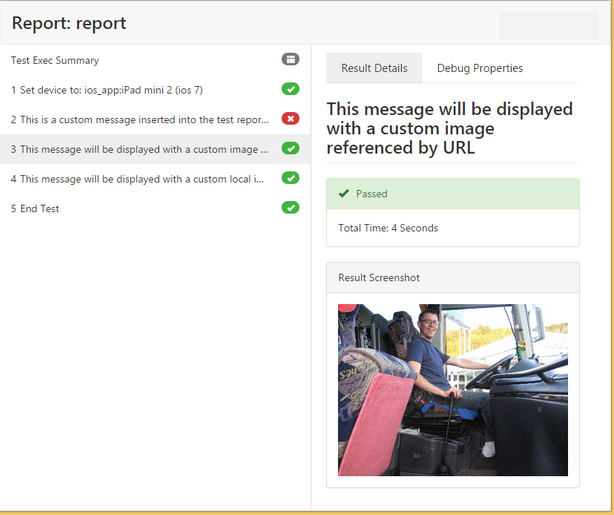
Note: T he step is marked as successfully passed owing to value True passed as the third argument (status).
Example Script: Report with a custom local image
Scenario: In this example, we will call command Report with a URL to a custom local image in a C# NUnit test:
client.report("C:\\Day_3\\IMG_20150210_114707.jpg", "This message will be displayed with a custom local image", true);client.Report("C:\\Day_3\\IMG_20150210_114707.jpg", "This message will be displayed with a custom local image", true);ic_report_with_image(&client, "C:\\Day_3\\IMG_20150210_114707.jpg", "This message will be displayed with a custom local image", IC_TRUE);self.client.reportWithImage("C:\\Day_3\\IMG_20150210_114707.jpg", "This message will be displayed with a custom local image", True)$client->reportWithImage("C:\\Day_3\\IMG_20150210_114707.jpg", "This message will be displayed with a custom local image", 1);
Result:
The first argument can be parsed as a valid image URL. As a result, the following step will appear in the report when a report of the test is generated:
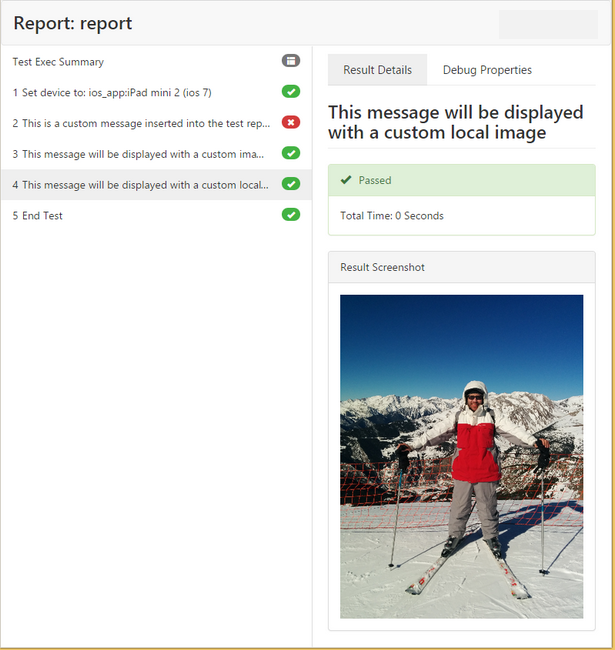
Note: T he step is marked as successfully passed owing to value true passed as the third argument (status).