
Silk Mobile
Table of Contents (Homepage)
- Overview
- Setting Up
- Getting Started
- How To
- Connecting Devices And Emulators
- Preparing Applications For Testing
- Managing Applications
- Recording Tests
- Working With Test Commands
- Adding Commands To Your Scripts
- Object Commands
- Click
- ClickCoordinate
- ClickIn
- ClickOffset
- Drag
- ElementGetProperty
- ElementGetTableRowsCount
- ElementListPick
- ElementListSelect
- ElementListVisible
- ElementScrollToTableRow
- ElementSendText
- ElementSetProperty
- ElementSwipe
- ElementSwipeWhileNotFound
- GetAllValues
- GetElementCount
- GetElementCountIn
- GetTextIn
- IsElementBlank
- IsElementFound
- IsFoundIn
- LongClick
- RunNativeAPICall
- SendWhileNotFound
- VerifyElementFound
- VerifyElementNotFound
- VerifyIn
- WaitForElement
- WaitForElementToVanish
- GetCoordinateColor
- DragDrop
- Application Commands
- Device Commands
- Web (Hybrid) Specific Commands
- Utilities Commands
- Monitoring Commands
- Configuration Commands
- ExtractLanguageFiles
- SetDefaultClickDownTime
- SetDefaultTimeOut
- SetDefaultWebView
- SetDragStartDelay
- SetInKeyDelay
- SetKeyToKeyDelay
- SetLanguage
- SetLanguagePropertiesFile
- SetShowImageInReport
- SetShowPassImageInReport
- SetShowReport
- SetSpeed
- SetThrowExceptionOnFail
- SetWebAutoScroll
- StartStepsGroup
- StopStepsGroup
- TextFilter
- Miscellaneous Commands
- Controlling Element Identification Rules
- Editing Test Objects
- Executing Test Scripts
- Report Of Executed Test
- Working From Code Environment
- Continuous Integration
- Layout Verification Tests
- Use Device Vitals Monitors
- Troubleshooting
- Terminology
SetNetworkConditions
SetNetworkConditions(Profile)
|
|
|


Description
Command to select the profile configured on the Network Virutlaizaiont server to test the device under the different network conditions.
Parameters
-
Profile: Different network conditions profile which was created in NetworkVirtualization Tool.
Note: Parameter set to None - means default profile without network conditions
Usage
-
Selecting the Profile:
Following is the NetworkVirtualization web portal. On the Profiles tab there is the list of profiles that are available on the Server.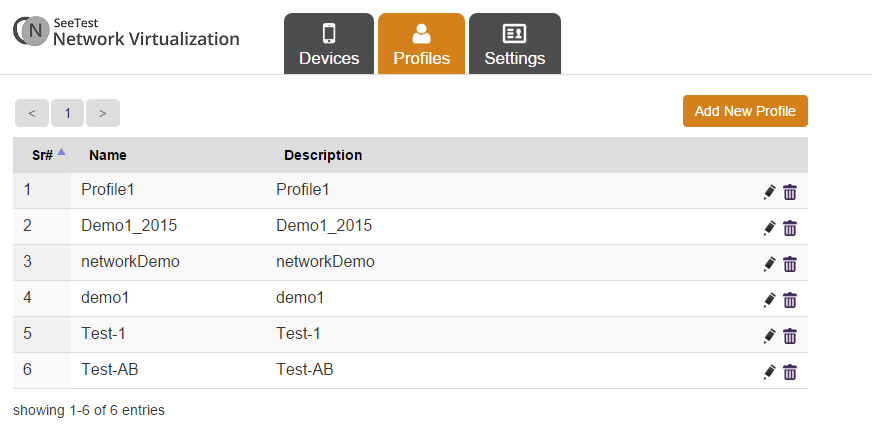
Same profiles should be available on the Silk Mobile. User can choose any of the give profiles on the list.
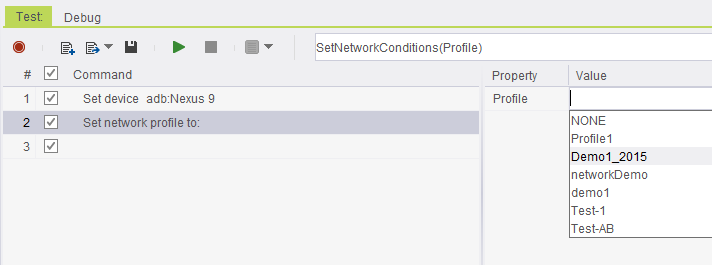
-
Setting the device. In this case, android device - SM-G900F
-
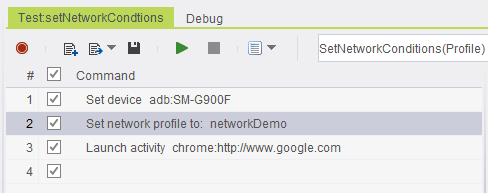
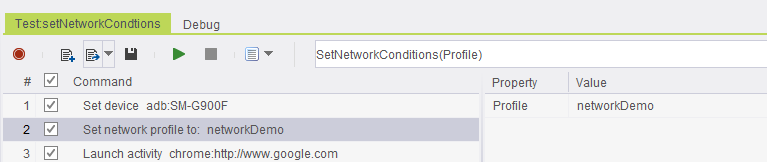
Selecting the profile using SetNetworkConditions command. In the following example it is the profile networkdemo.
Note: Use the Launch command to launch google.com on chrome.
Code Examples
client.setNetworkConditions("networkDemo");client.SetNetworkConditions("networkDemo");client.SetNetworkConditions "networkDemo"self.client.setNetworkConditions("networkDemo")$client->setNetworkConditions("networkDemo");