
Silk Mobile
Table of Contents (Homepage)
- Overview
- Setting Up
- Getting Started
- How To
- Connecting Devices And Emulators
- Preparing Applications For Testing
- Managing Applications
- Recording Tests
- Working With Test Commands
- Adding Commands To Your Scripts
- Object Commands
- Click
- ClickCoordinate
- ClickIn
- ClickOffset
- Drag
- ElementGetProperty
- ElementGetTableRowsCount
- ElementListPick
- ElementListSelect
- ElementListVisible
- ElementScrollToTableRow
- ElementSendText
- ElementSetProperty
- ElementSwipe
- ElementSwipeWhileNotFound
- GetAllValues
- GetElementCount
- GetElementCountIn
- GetTextIn
- IsElementBlank
- IsElementFound
- IsFoundIn
- LongClick
- RunNativeAPICall
- SendWhileNotFound
- VerifyElementFound
- VerifyElementNotFound
- VerifyIn
- WaitForElement
- WaitForElementToVanish
- GetCoordinateColor
- DragDrop
- Application Commands
- Device Commands
- Web (Hybrid) Specific Commands
- Utilities Commands
- Monitoring Commands
- Configuration Commands
- ExtractLanguageFiles
- SetDefaultClickDownTime
- SetDefaultTimeOut
- SetDefaultWebView
- SetDragStartDelay
- SetInKeyDelay
- SetKeyToKeyDelay
- SetLanguage
- SetLanguagePropertiesFile
- SetShowImageInReport
- SetShowPassImageInReport
- SetShowReport
- SetSpeed
- SetThrowExceptionOnFail
- SetWebAutoScroll
- StartStepsGroup
- StopStepsGroup
- TextFilter
- Miscellaneous Commands
- Controlling Element Identification Rules
- Editing Test Objects
- Executing Test Scripts
- Report Of Executed Test
- Working From Code Environment
- Continuous Integration
- Layout Verification Tests
- Use Device Vitals Monitors
- Troubleshooting
- Terminology
ClickOffset
void click (zone, element, index, ClickCount, X, Y)
|
|
|
|
|
|
|






Description
Click an element with an offset
Parameters
Usage
Command usage: There is the possibility to use the extended version of the click command.
There are two additional parameter you need to give
-
X: Horizontal Offset from Element. "+" before the number in X field means Right and "-" means Left.
-
Y: Vertical Offset from Element. "+" before the number in Y field means Down and "-" means Up.
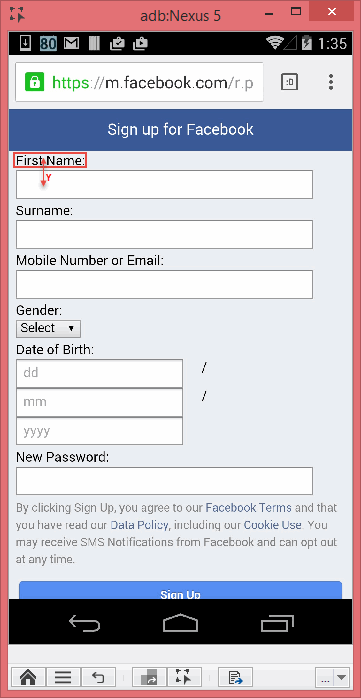
Scenario: In the following example I will click on the"Last Name" field.
To press on the 'First Name' text field you can use the "click" command, and set the vertical offset so that the click will be executed under the label and in the text field.
Parameters:
-
Zone: set to be "WEB"
-
Element: set to "text=First Name"
-
Index: set to 0
-
Click count: number of clicks - set to 1
-
X: The vertical offset from the middle of the object – set to 0
-
Y: The horizontal offset from the middle of the object– set to 20
Result: The element will be recognized but the Click event will be sent on an offset to the text field.
Code Examples
Command is available on all supported code languages
client.click("WEB", "text=First Name", 0, 1, 0, 20);client.Click("WEB", "text=First Name", 0, 1, 0, 20);client.Click "WEB", "text=First Name", 0, 1, 0, 20Reportself.client.clickOffset("WEB", "text=First Name", 0, 1, 0, 20)$client->clickWithOffset("WEB", "text=First Name", 0, 1, 0, 20);