AccuRev® Quick Reference


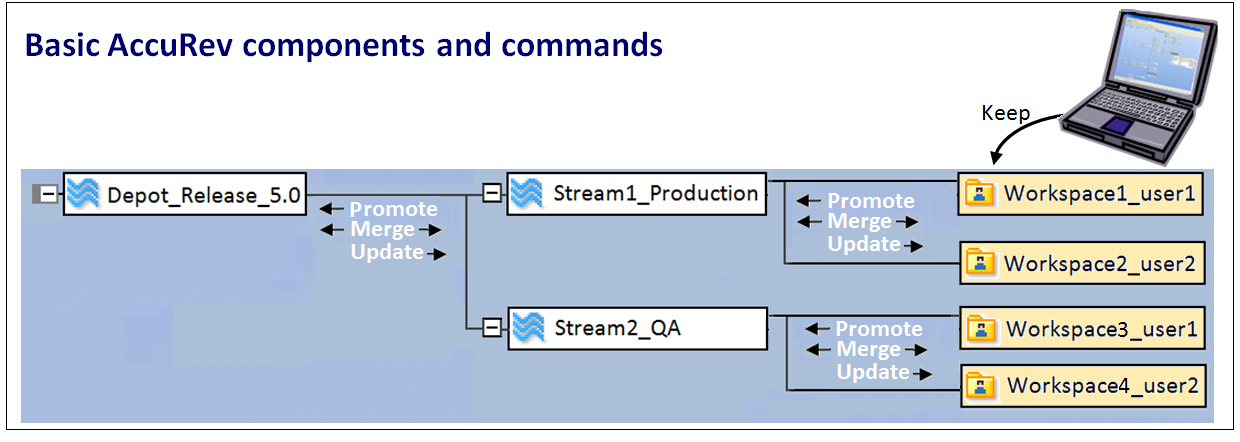
Workspace - Private developer work area.
Stream - Configuration of related elements. Code may be promoted into or inherited from streams.
Depot - Main repository on a server for all related source code.
Snapshot - Static (protected) stream that cannot be moved, renamed, or altered.

Add - Places the initial version of a file on the AccuRev server.
Keep - Places subsequent versions of a file on the AccuRev server where it remains private.
Promote - Moves code into an AccuRev parent stream where it is accessible to others.
Update Preview - Lists the files that will be updated with the Update command.
Update - Retrieves all newer versions of a file from the stream that is above it in the project hierarchy. (Use to update stale files.)
Populate - Restores a file that is missing from the workspace by copying it from the parent stream. (Use to populate a workspace with missing files.)
Merge - Allows a developer to resolve differences between a workspace version and a stream version of a file.
Anchor - Prevents a modified file in your workspace from being updated.
Defunct - Removes a file or directory from your workspace. Removes promoted elements from other people’s workspaces when they Update.
Purge - Reverts a file on your workspace to the backed version in the stream.

External - The file exists on the local computer but has not yet been placed under AccuRev control.
Kept - The file has been saved to the AccuRev server but is still private in the developer’s workspace.
Backed - The file has been promoted to the parent stream.
Modified - The version of the file in the developer’s workspace is newer than the version in the parent stream.
Overlap - The version of the file in the parent stream has been modified and the file in the developer’s workspace has also been modified.
Underlap - The version in the parent stream already contains the workspace changes, but is not the ancestor of the file. Resolve with Revert to Backed, Merge, or Purge command.
Pending - The file in a workspace has a status of kept or modified.
Member - The file has been promoted and is a member of a stream’s active files.
Stale - The version of the file in the parent stream has been modified and the version in the developer’s workspace has not been modified.
Default Group - Files that are known as “active files,” which are files that can be worked on within a workspace.
Stranded - Files that are not referenced by any directory in the stream of which they are a member. May indicate presence of twins - two or more elements that have the same pathname.

Browsers provide alternative views of the AccuRev configuration of files:
StreamBrowserTM ( ) - Displays all the streams and workspaces in the current depot, showing the parent/child (hierarchical) relationships. You can also reparent streams and workspaces using drag and drop.
StreamBrowserTM (
) - Displays all the streams and workspaces in the current depot, showing the parent/child (hierarchical) relationships. You can also reparent streams and workspaces using drag and drop.File Browser - Displays the files and folders within a workspace or stream. With File Browser, you can view lists of files and folders, monitor their statuses, search for files, and open the files to edit their contents.
History Browser ( ) - Displays (1) the transactions involving a particular workspace, stream, or depot, (2) the active transactions of a particular stream, or (3) a single transaction or a specified group of transactions.
) - Displays (1) the transactions involving a particular workspace, stream, or depot, (2) the active transactions of a particular stream, or (3) a single transaction or a specified group of transactions.Version Browser ( ) - Displays ancestry information for each element, indicating how each version was created.
) - Displays ancestry information for each element, indicating how each version was created.

 Include (Incl) - Make the selected file or directory appear in the workspace or stream, including the subtrees below a directory. Use this command to include directories and all subdirectories and files.
 Include Directory Only (Incldo) - Display the selected directories in the workspace or stream, but not any of the files within the directory. Use this command to include specific files and directories that are in a depot’s hierarchy, without including other unwanted files or directories.
 Include from Stream - Identifies a stream to be used for inheritance. Use this command to cause elements to inherit versions from the stream you specify, instead of inheriting versions from the backing stream.
 Exclude - Exclude the selected file or directory from the workspace or stream. Use this command to include directories and all subdirectories and files, excluding those specified.