The StarTeam APIs are object-oriented. This means that the interfaces are exposed as a set of objects with properties and methods. The specific object types that are defined, and the various relationships among the objects, are together referred to as the StarTeam object model.
There are over a hundred objects in the StarTeam object model. However, the number of objects that you are likely to use in developing a typical custom application is much smaller. Furthermore, if you are familiar with the StarTeam product, the object model will be easy to learn, because the objects represent things that you already understand: Server, Project, View, Folder, File, and so on.
Some of the specifics regarding how the various objects, properties, and methods are exposed in the StarTeam APIs depend on whether you are using the Java interfaces, the C-style COM interfaces, or the Automation interfaces. However, the basic StarTeam object model is the same across all flavors of the API. Once you learn the object model and are comfortable developing StarTeam applications in one programming environment, the concepts you have learned can be re-used in other environments as well.
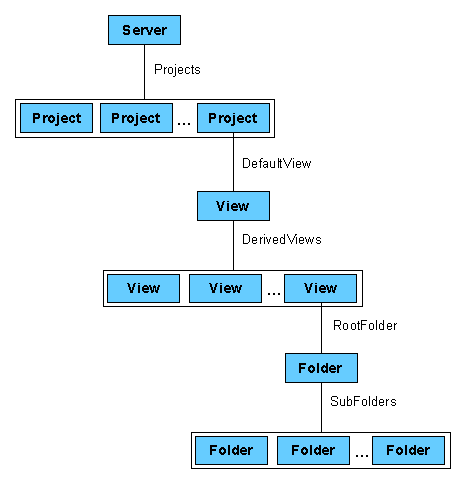
The most fundamental objects in the StarTeam object model are those that represent a StarTeam Server and the associated Projects, Views, and Folders. These objects will be used by almost every StarTeam application. The various relationships among these objects are shown graphically in the figure below.
The Server object is the root object of the StarTeam object model. Conceptually, it represents a StarTeam Server (repository). Every other object is accessible, either directly or indirectly, via the Server object.
Most StarTeam applications will begin by constructing a Server object. Exactly how this is done depends on whether you are using the Java APIs, the C-style COM APIs, or the Automation APIs. This will be discussed in more detail later. For the purpose of this section, assume that you have managed to obtain a Server object, and you are ready to use it.
In order to use the Server object, you must first establish a connection to a specific StarTeam Server, and log on as a specific user. This is done using the method of the Server object.
All subsequent operations on the Server object (or on the objects that are accessible from the Server object) will be performed in the security context of the logged-on user. The security context determines access rights. For example, some methods require Administrator privileges and will generate an error if the logged-on user is not a StarTeam administrator.
The Project object represents a project that is available on the StarTeam server. Once you have logged in to a server, you can access the set of projects that are available, using the Projects property of the Server object.
The value of the Projects property is a collection of Project objects. Collections are common in the StarTeam object model. The precise representation of a collection depends on which flavor of the StarTeam APIs you are using. However, all versions allow you to iterate through the members of the collection, search for a specific member, and so on.
The View object represents a view of a StarTeam project. Each Project object has a Views property, whose value is a collection of View objects representing views that have been defined for that project. The default view can be accessed directly via the DefaultView property of the Project object.
In StarTeam, a view can be derived from, or based on, a parent view. Each View object has a DerivedViews property, whose value is a collection of View objects for the views that were derived from this one. Each view also has a ParentView property, whose value is the view from which it was derived. The DerivedViews and ParentView properties of the View objects can be used to traverse the View hierarchy of a project, whereas the Views property of the Project object presents the views as a flat list.
The Folder object represents a StarTeam folder. Each View object has a RootFolder property, whose value is the Folder object representing the root folder of the view. Each folder has a SubFolders property, whose value is a collection of the subfolders of this one, and a ParentFolder property, whose value is the parent folder. The SubFolders and ParentFolder properties can be used to traverse the folder hierarchy of a StarTeam view.
Folders can contain Items of various types, such as Files, Change Requests, and so on. Items of a particular type are retrieved using the method of the Folder object. Items are discussed in more detail in the following section.
Items are the objects that represent the main data elements in the StarTeam repository, including Files, Change Requests, Topics, etc. Not all item types are necessarily available on every server, and some servers may support custom item types.
The StarTeam object model defines both a general Item class and derived classes for File, ChangeRequest, Topic, and Task. Items in general have a certain set of properties and methods. Each derived class inherits the properties and methods of the Item class, and adds specialized properties and methods that are specific to the derived class. In fact, the Item class itself is derived from a more general class known as TypedResource. The Item class hierarchy is shown in the figure below.
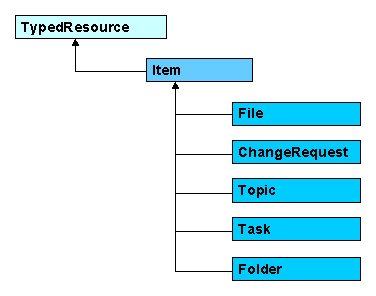
A general class that provides methods for retrieving arbitrary named properties of objects. The method retrieves the value of a named property, and the method sets the value of a named property.
Represents a data item stored in a folder within a StarTeam project. Items inherit the properties and methods of the class, and define additional convenience methods for retrieving named properties that are available for all items.
For example, all items have a parent folder, which can be accessed directly via the ParentFolder property of the Item class, or indirectly by way of the method of the TypedResource class (by specifying the appropriate property name).
The Item class also provides properties and methods to access the History of an item, the Attachments associated with an item, and so on.
Inherits all properties and methods of the Item class, and adds properties and methods that are specific to Files, such as , , , and so on.
Provides convenience methods for manipulating ChangeRequest properties such as Status, Synopsis, Description, and so on.
Provides convenience methods for manipulating the Title of a topic, the Text, the ReadStatus, and so on.
Provides access to a task’s EstimatedStart date, EstimatedFinish date, Duration, and so on.
The hierarchical Item object model has several advantages. For custom StarTeam applications that are designed specifically to manipulate one item type (for example, a ChangeRequest), the application is free to use APIs that are specially tailored for that item type (for example, Status, Synopsis, and Description properties). On the other hand, an application may be designed to work with any type of item in the repository by using the more general, but possibly less convenient, Item-level interfaces.
This generalization is also important because StarTeam allows the administrator to customize the repository. This includes the ability to add custom fields to any item type, add or rename values to enumerated fields, and so on. In fact, it is possible for third parties to add custom item types to the repository that were not anticipated at the time the StarTeam API was developed. By using the generalized Item-level interfaces, the StarTeam SDK is capable of manipulating data that has been customized in application-specific ways.
You may have noticed that the Folder class derives from the Item class. One implication of this is that developers of custom StarTeam applications can add custom fields to a Folder object, and manipulate them via the StarTeam API. This is a feature that is currently not supported via the StarTeam Windows client.
In order to make the Item-level interfaces truly useful in the context of a customized repository, the StarTeam SDK needs a way to introspect on the repository schema. That is, it must be possible to discover the item types available on a given server, the properties available for a given item type, the data type or list of possible values for a given property, and so on.
The object types that support introspection of the repository schema are shown in the figure below.
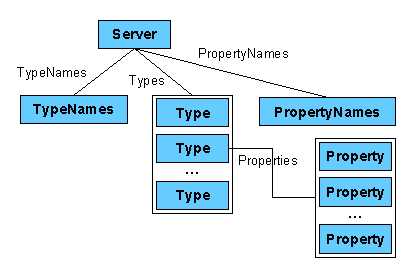
An object whose properties provide the names of the built-in object types in the StarTeam repository. For example, the FILE property of the TypeNames object contains the internal name of the "File" object type.
It is always better to use the TypeNames object to get the name of an object type, rather than hard-wiring a specific string in your program. Using the TypeNames object will isolate your application from any future name changes that might be made to the repository schema. For example, to retrieve the list of files in a given folder, you might use:
Folder.getItems(Server.TypeNames.FILE) |
Represents a specific object type available on the server. The Server object has a Types property, whose value is a collection of the available Type objects. This includes non-Item object types (such as Project, View, and so on), as well as custom item types that might be provided by third parties.
An object whose properties provide the names of the default properties of the built-in object types in the StarTeam repository. For example, the CR_STATUS property of the PropertyNames object contains the internal name of the "Status" property of ChangeRequest objects.
It is always better to use the PropertyNames object to get the name of a property, rather than hard-wiring a specific string in your program. Using the PropertyNames object will isolate your application from any future name changes that might be made to the repository schema.
Represents a property that is defined for a given object type. Each Type object has a Properties property, whose value is a collection of the Property objects for the properties defined for that Type. This includes the default Item properties (that is, those described in the PropertyNames object), as well as custom properties that have been added to the repository by the StarTeam administrator.
The Type and Property objects are valuable to any StarTeam application that is general enough to support repository customizations. For example, any application that lists the items in a folder, and displays the values of all properties that are available for those items, would need to examine the Type and Property objects to determine what information is available in the repository.
The Property object itself has properties and methods (in the SDK) that can be used to obtain information about the property (in the StarTeam repository). For example, the Name property of the Property object retrieves the internal property name as used in the repository schema. The DisplayName property provides a corresponding user-friendly name, as might be displayed in an application’s user interface. The TypeCode property indicates the data type of the Property object, which allows an application to display values of the property in an intelligent fashion.
To retrieve the Type object corresponding to a specific object type, use the method of the Server object. To retrieve the Property object corresponding to a specific named property, use the method of the Type object. So, for example, to get the Property object corresponding to the Status property of a ChangeRequest object, you might use the following:
type = server.typeForName(server.TypeNames.CHANGEREQUEST) prop = type.propertyForName(server.PropertyNames.CR_STATUS) |
The Item object has convenience methods that may be used to achieve the same result. So, if you have a specific ChangeRequest object available, you could use the following:
prop = cr.propertyForName(cr.PropertyNames.CR_STATUS) |
Some properties have a value that is an enumerated type. (Such properties have a TypeCode equal to Property.Types.ENUMERATED.) StarTeam administrators can customize the display names of each enumerated value, and, in some cases, add new enumerated values.
To get the list of possible values for an enumerated type, use the EnumValues property of the Property object. The value of the EnumValues property is a collection of integers, each of which is a code representing one of the possible values. To get a user-friendly display string for the enumerated value code, use the method of the Property object. So, for example, to retrieve the Status property of a Change Request, and convert the resulting code to a user-friendly display string, you could use the following:
prop = cr.propertyForName(cr.PropertyNames.CR_STATUS) status = prop.getEnumDisplayName(cr.Status) |
In most cases, convenience methods are available that simplify the manipulation of enumerated types. For example, the ChangeRequest object has a method that can be used to convert a status value to a display string, as follows:
status = cr.getStatusDisplayName(cr.Status) |
It is important to understand that the convenience methods in the StarTeam API are useful, but not required. When an application wants to perform similar operations on custom fields, it may be necessary to use the lower-level methods of the Item, Type, or Property objects.
 Back Back
 Home
Next Home
Next
|