
The StarTeam SDK for .NET is a native .NET implementation of the StarTeam SDK.
This document provides basic information intended to help you get started using the StarTeam SDK for .NET. It assumes that you are already familiar with the StarTeam SDK for Java and COM, and focuses mainly on .NET-specific features.
For more detailed information on the StarTeam SDK programming interfaces, consult the StarTeam SDK for .NET help file.
The StarTeam SDK for .NET is designed to support the following:
To support these development scenarios, the StarTeam SDK for .NET actually provides two complete sets of APIs:
The C# APIs are actually implemented as thin wrapper classes, using the J# APIs in their underlying implementation. In fact, the two APIs are designed to work well together; that is, application code written to the C# APIs can interoperate with application code written to the J# APIs.
The following sections describe how each of the application types listed above would use the StarTeam SDK for .NET APIs.
Core applications are written in Java and cross-compiled to the .NET platform using Microsoft Visual J#. Such applications use the J# flavor of the StarTeam.NET APIs, which are found in StarTeam.Core.dll.
This scenario is shown graphically in the figure below.
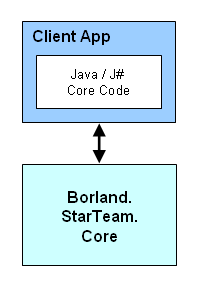
The J# APIs are virtually identical to the Java APIs.
Native applications written from scratch for the .NET platform are usually written in C# or Visual Basic .NET. Such applications will use the C# flavor of the StarTeam.NET APIs, which are found in StarTeam.dll.
This scenario is shown graphically in the figure below.
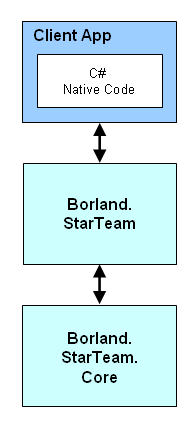
If you are already familiar with the StarTeam Java APIs (or the .NET APIs for J#), then the C# APIs should look familiar. The basic object model is the same. The differences are designed to make the C# APIs integrate better into the .NET environment.
The remainder of this section describes the most important differences between the C# and J# flavors of the StarTeam .NET APIs.
The J# APIs use the com.starteam namespace; the C# APIs use the StarTeam namespace.
The J# APIs use method names that start with a lowercase letter; the C# APIs use method names that start with an uppercase letter.
The C# APIs use .NET properties where applicable; the J# APIs use get/set methods that serve as property accessors. For example, the following J# code that uses the J# APIs:
v = project.getDefaultView(); |
would become the following C# code using the C# APIs:
v = project.DefaultView; |
The C# APIs use indexers where applicable; the J# APIs use get/set methods. For example, the following J# code that uses the J# APIs:
s = cr.get("Synopsis");
cr.put("Synopsis", "Just testing...");
|
would become the following C# code using the C# APIs:
s = cr["Synopsis"]; cr["Synopsis"] = "Just testing..."; |
In the J# APIs, events are exposed using the Java listener model. In the C# APIs, events are exposed using native .NET events.
The two models are significantly different in some respects. In .NET, an event handler is registered via an operator on the event object. There is no opportunity to provide additional parameters that describe an item type, the scope of interest, and so on.
For these reasons, the C# event APIs use the same basic event source model that was introduced in the StarTeam event APIs for COM. There is one type (such as, ) in the C# APIs for each listener interface (such as, ) in the J# APIs.
objects are created by factory methods defined in the relevant parent classes. For example, is a factory method defined in the class (and also in the class and the class) that returns an . Where necessary, the factory methods take parameters that define the scope of interest.
For example, the following J# code that uses the J# APIs:
void listenForFilesAdded(View view) {
    Server s = view.getServer();
    Type type = s.typeForName(s.getTypeNames().FILE);

    // Register an event listener with the view.
    view.addItemListener(new ItemAdapter() {

        // The event handler.
        public void itemAdded(ItemEvent e) {
            File file = (File)e.getNewItem();
            System.out.println("File Added: " + file.getName());

        }, type); // The type parameter refines the scope.
}
|
would become the following C# code using the C# APIs:
void ListenForFilesAdded(View view) {
    Server s = view.Server;
    Type type = s.TypeForName(s.TypeNames.FILE);

    // Create an event source via a factory method on the view.
    // The view and item type define the scope of interest.
    ItemEventSource source = view.NewItemEventSource(type);

    // ItemEventSource exposes the OnItemAdded event (and others).
    // Attach an application event handler.
    // ItemEventSource.Handler is a delegate type.
    source.OnItemAdded += new ItemEventSource.Handler(OnFileAdded);
}

// The event handler.
private void OnFileAdded(ItemEventSource source, ItemEventArgs args) {
    File file = (File)args.NewItem;
    Console.WriteLine("File Added: " + file.Name);
}
|
Here, the class exposes the event (and others). It also defines the delegate type, used for event handlers. The client application's event handler takes two parameters: the that triggered the event, and the that provides the event data.
In many cases where the J# APIs return an array of objects, the C# APIs return an instance of a StarTeam-specific collection class (for example, , , and so on).
The collection classes are strongly typed, and implement the standard .NET , and interfaces. They are also modifiable, and support other common operations such as searching and sorting. For example:
// Collections are indexed by name, where appropriate.
p = server.Projects["StarDraw"];

// Collections can be sorted easily.
foreach (Label l in view.Labels.SortByID().Reverse()) {
    . . .
}
|
The collection classes support implicit cast operators for converting to an array of objects. For example, a StarTeam.ItemCollection can be cast to a StarTeam.Item[].
However, there are memory management issues to consider. Casting to an array of objects in the C# namespace requires that C# wrapper objects exist for every member of the collection simultaneously. If you are simply iterating over the members of a large collection, it would be more efficient to use the standard .NET collection interfaces. For example:
// Allocates one C# wrapper object for every
// member of the collection, simultaneously.
StarTeam.ItemCollection c;
StarTeam.Item[] items = c;
for (int i = 0; i < items.Length; i++) {
    Item item = items[i];
    . . .
}

// Allocates one C# wrapper object at a time.
StarTeam.ItemCollection c;
foreach (Item item in c) {
    . . .
}
|
The C# APIs use native .NET data types instead of Java data types, where applicable. For example, File.CheckoutToStream() takes a System.IO.Stream, rather than a java.io.OutputStream.
Some SDK types are also mapped to more appropriate .NET types. For example, becomes ; and both become .
Classes and methods that were deprecated in the Java APIs prior to the release of the .NET SDK are missing from the C# APIs.
In this scenario, the application's core business logic is written in Java, and is cross-compiled to the .NET platform using Microsoft Visual J#. The core code uses the J# flavor of the StarTeam SDK APIs.
The user interface, or other .NET-specific edge code, is typically written in C# or Visual Basic .NET. The edge code uses the C# flavor of the StarTeam SDK APIs.
This is shown graphically in the figure below.
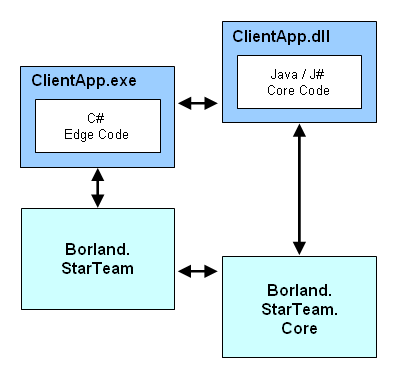
In order for this to work, the client application's edge code, written to the C# flavor of the StarTeam APIs, must be able to interoperate with the application's core code, written to the J# flavor of the APIs. For example, it must be possible for the edge code to create a StarTeam.Server object, and pass it to a method in the core code that requires a com.starteam.Server object.
Fortunately, the StarTeam SDK for .NET was explicitly designed to support this scenario. Interoperability between core and edge components is described in the following subsections.
A StarTeam object from the C# namespace can be implicitly cast to the corresponding type in the J# namespace. For example:
StarTeam.Project p1; com.starteam.Project p2 = p1; |
StarTeam classes in the C# world include a static Wrap() method that can be used to wrap the corresponding objects in the J# world. For example:
com.starteam.Project p1; StarTeam.Project p2 = StarTeam.Project.Wrap(p1); |
The method hides details of the wrapping process from the client application. For example, might actually return a object. also handles null objects correctly.
Each interface defined in the SDK has a corresponding Adapter class that can
convert from an instance of the interface in the C# world to an instance of the
interface in the J# world, and vice versa. The adapter classes are public, and
are available for use by client applications.
For example, to convert an instance of the interface from the namespace to the namespace, you would use
the , as follows:
StarTeam.ISecurableObject obj1;

com.starteam.ISecurableObject obj2 =
        = new StarTeam.ISecurableObjectAdapter(obj1);
|
Note that the adapters are bi-directional; thus, the following is also supported:
com.starteam.ISecurableObject obj1;

StarTeam.ISecurableObject obj2 =
        = new StarTeam.ISecurableObjectAdapter(obj1);
|
Adapters are also available for some common Java data types. These can be found in the B namespace.
For example, to convert a to a , you would use the InputStreamAdapter, as follows:
java.io.InputStream s1;

System.IO.Stream s2 =
        new StarTeam.Util.JSharp.InputStreamAdapter(s1);
|
Most, but not all, of the adapters for the Java data types are bi-directional.
When the actual type of an object is not known until runtime, dynamic type conversion services are available via static methods on the SDKWrapper class. For example:
// Convert a core object of unknown type // from the J# world to the C# world. object obj2 = SDKWrapper.Wrap(obj1); // Convert an edge object of unknown type // from the C# world to the J# world. object obj3 = SDKWrapper.Unwrap(obj2); |
These dynamic type conversion facilities work with SDK types, with objects that implement SDK interfaces, with Java classes for which there is an adapter implemented in the SDK, and so on. However, dynamic conversion is somewhat more expensive than the other mechanisms, and for that reason dynamic conversion should not be used in cases where the type is known at compile time.
Last Modified September 9, 2004.